How to Effectively Block Spam Comments on WordPress
When a blog is first set up, annoying spam comments often appear. This is a headache for many beginners, and in severe cases, attackers use spam comments to flood your database. Therefore, it is necessary to take preventive measures.
Analysis of spam comments reveals that most are from bots, characterized by content that is entirely in English or Japanese, which is undesirable. Such comments should not even be written to the database. You can achieve this by adding the following code to the functions.php file in your theme directory:
// Block pure English and pure Japanese comments
function inlojv_comment_post( $incoming_comment ) {
$pattern = '/[一-龥]/u';
// Block pure English comments
if(!preg_match($pattern, $incoming_comment['comment_content'])) {
wp_die( "Your comment must contain Chinese characters!" );
}
$pattern = '/[あ-んア-ン]/u';
// Block Japanese comments
if(preg_match($pattern, $incoming_comment['comment_content'])) {
wp_die( "Comments are not allowed to contain Japanese!" );
}
return( $incoming_comment );
}
add_filter('preprocess_comment', 'inlojv_comment_post');
// End of blocking spam comments
Additionally, if you find users who manually reply but always leave low-quality comments such as "visit each other," "support," or simply leave links, you can mark these replies as spam.
Go to Dashboard > Settings > Discussion > Comment Blacklist to configure this. Add the websites (prioritizing gambling sites), email addresses, and IP addresses of such users to the list. When these users comment again, their submissions will automatically be marked as spam.
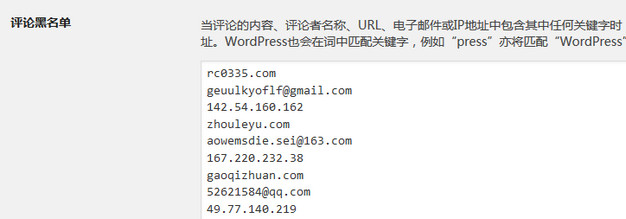 Comment Blacklist
Online solutions also offer sliding unlock mechanisms and CAPTCHA methods, which can effectively block spam comments. However, these methods are not recommended as they may negatively impact user experience. WordPress's built-in spam plugin, Akismet, is also very powerful. Some users have reported that enabling this plugin may slightly slow down the commenting process. Ultimately, you can choose the solution that best fits your needs.