Shouqianba Aggregated Payment Tool: Application Guide and User Experience Review
During offline transactions, I frequently noticed many merchants using Shouqianba tools for payments, which sparked my interest. I decided to apply for a Shouqianba aggregated payment account myself and am sharing my application process and usage experience in this article.

About Shouqianba
Established in 2013, Shouqianba operates with the mission "Serving millions of merchants, the all-around business assistant." It has now become a leading comprehensive digital store service provider in China. Through the power of networks and data, Shouqianba provides merchants with professional mobile payment collection, marketing management software, advertising, supply chain services, shared power banks, merchant communities, and more, comprehensively addressing the store-opening needs of offline merchants. — Content quoted from the Shouqianba official website
Advantages
- Supports aggregated payments for Alipay, WeChat Pay, and UnionPay Cloud QuickPass
- Supports payment voice broadcast (requires installing the app or purchasing payment devices)
- Supports a tiered account system, facilitating use across multiple stores or by employees
Appointment for Account Opening
- Appointment Address: https://invite-h5.shouqianba.com/share?inviteCode=REY345042&accountId=29e90918-4c58-49ba-b677-65bce1b0e17d&activityType=A
Using the invitation link above for appointment will earn you 1,000 points upon successful account opening.
Account Opening Process
I applied on the afternoon of the day, and the next morning received a follow-up call from Shouqianba. After adding the customer service representative on WeChat, they informed me of the required documents. I applied using "Individual Industrial and Commercial Household" qualifications; reportedly, individual users can also apply, but with transaction limits.
Preparation of Documents
- Front and back photos of the legal representative's ID card
- Screenshot of the payment bank card
- Photos of the storefront exterior and interior
- Business license
Waiting for Approval
After providing the prepared documents to customer service, they would handle the application (I would prefer a self-service application channel where users can fill in and submit their own data for review). Shortly after, I received an SMS notification from Shouqianba containing the "login account," "login password," and "management password." Please save these securely for future use.
Document review usually takes a few hours. If there are issues with the documents, customer service will ask you to prepare them again. If everything goes smoothly, the account can be opened on the same day. There is no fee for account opening.
Payment Tools
The following payment tools are available; you can choose based on your needs.
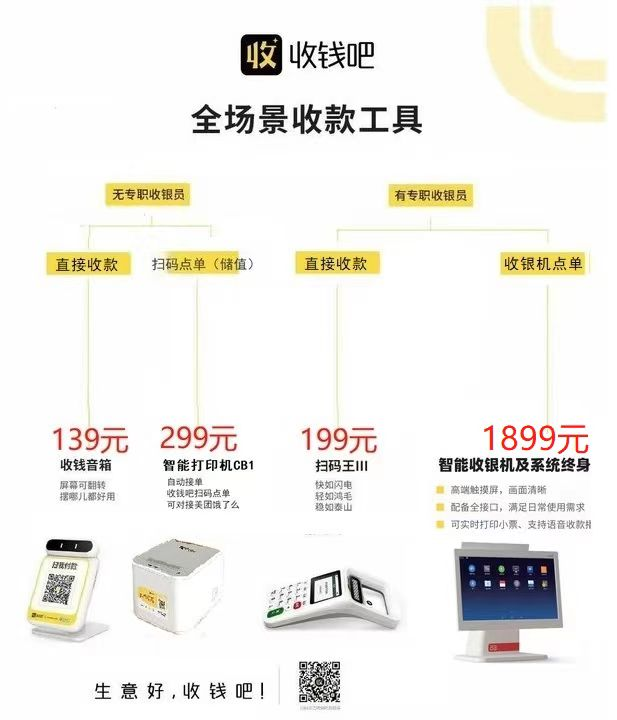
If you do not currently need physical payment devices, you can inform customer service, and they can activate a "digital payment code" for you. The digital payment code is free of charge; you can consider purchasing physical payment tools later if needed.
Activating the Digital Payment Code
After successfully applying for the digital payment code, you need to make a 2 RMB transaction to activate it (simply scan the code using your WeChat or Alipay). Customer service informed me that if no transactions occur within 7 days, the payment code may be closed, requiring reactivation.
Payment Fees
- Alipay/WeChat Pay fee:
0.38% - UnionPay Cloud QuickPass fee:
0.38%for amounts between 0-1000 RMB;0.6%for amounts over 1000 RMB - Yipay fee:
0.6%
For detailed information, see the table below:
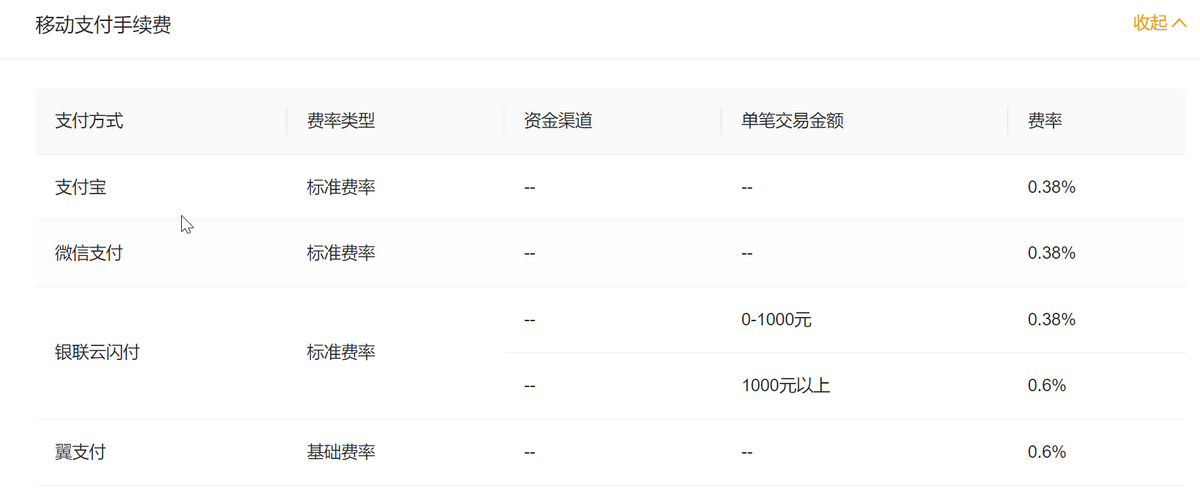
In summary, the fees range from 0.38% to 0.6%, which is quite competitive.
Settlement Time
After a user makes a payment, the funds are immediately credited to Shouqianba. Shouqianba then transfers the money to your designated payment bank account the following day (regardless of weekends or holidays).
Risk Control
Unknown!
Are There Any Pitfalls?
Unknown!
Other Notes
The blogger tested and found that UnionPay scanning payment (non-Cloud QuickPass) is not supported.
Conclusion
Shouqianba conveniently enables aggregated payments for Alipay, WeChat Pay, and UnionPay Cloud QuickPass. Account opening is free, and the digital payment code does not require additional fees. Physical payment devices must be purchased separately. Shouqianba's payment fees range from 0.38% to 0.6%, with funds settled to your bank account the next day.
Shouqianba Account Opening Appointment Address: https://invite-h5.shouqianba.com/share?inviteCode=REY345042&accountId=29e90918-4c58-49ba-b677-65bce1b0e17d&activityType=A (You will receive a 1,000 points reward after opening an account)