How to Fix Public Key Retrieval is Not Allowed Error in DBeaver for MySQL 8
dbeaver mysql 8public key retrieval is not allowedmysql connection errorallowpublickeyretrievalusessl false
Published·Modified·
Recently, a new service required a MySQL 8 database. After installation, connecting via the DBeaver client resulted in the error "Public Key Retrieval is not allowed".

Solution
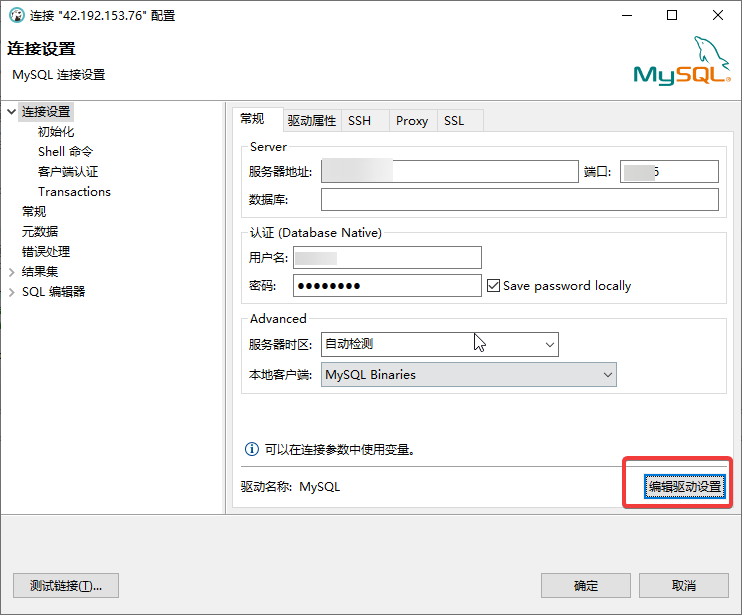
Edit the connection and then edit the driver settings.
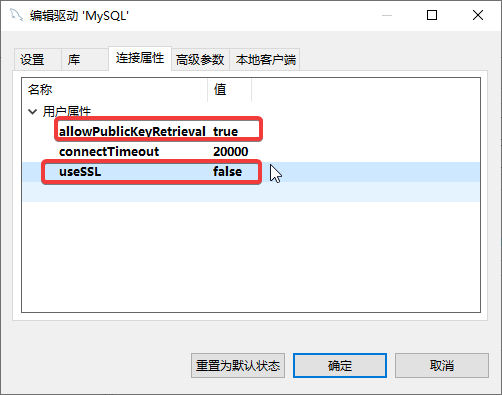
Switch to Connection Properties, right-click, and add the following two new properties:
allowPublicKeyRetrieval:trueuseSSL:false
See the screenshot below:
Save the changes and reconnect.
This article references: Connection Java - MySQL : Public Key Retrieval is not allowed