How to Use uTools Offline: Manual Plugin Installation Guide
uTools is a minimalist, plugin-based, cross-platform modern desktop software that supports Windows, macOS, and Linux systems. As briefly introduced in the article Multi-functional, Cross-platform Efficiency Tool uTools, plugins are the core of uTools. If you use uTools without a public network environment, you cannot install plugins online, leaving the software in a limited state. However, the official website provides a hidden download link for offline plugins, allowing for manual installation.

Install the uTools Main Program
First, visit the uTools official website: https://u.tools/ to download and install the main program.
Offline Plugin Installation
Visit the plugin page: https://api.u-tools.cn/Plugins/Developer/allPlugins to download the plugins you need.
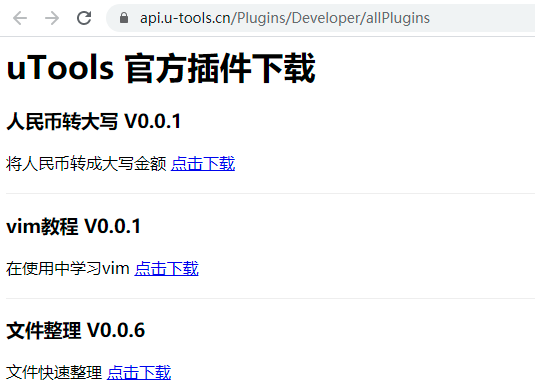
After downloading, the files will have a *.upx extension. Select the downloaded plugin and press Ctrl + C to copy it.

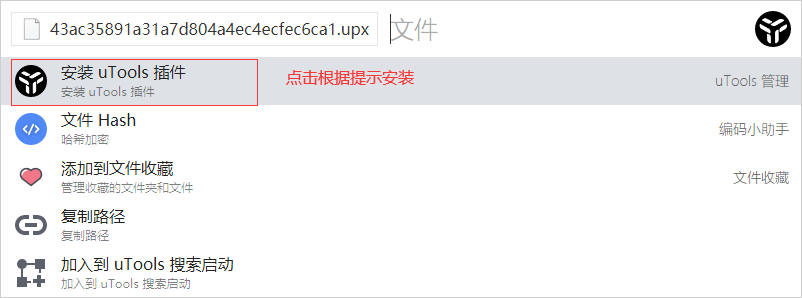
Press the shortcut ALT + Space again to launch uTools. You will see the installation option; follow the prompts to complete the installation.
Conclusion
uTools supports cross-platform usage, offers a rich variety of plugins, and the number of plugins continues to grow. You can also develop plugins according to your needs. uTools can significantly improve efficiency, and we recommend giving it a try.