Top WordPress Caching Plugin: WP Super Cache
This plugin generates static HTML files for your WordPress blog. The generated HTML files are served directly from the server instead of executing PHP on every page load, thereby reducing server pressure, minimizing requests, and improving speed.
The plugin offers three modes:
mod_rewrite caching mode: The fastest method uses the Apache mod_rewrite module (or a similar module in other web servers) to serve static HTML files directly to users. This completely bypasses the PHP parser, offering incredible speed that can easily handle very high traffic while keeping server operations lightweight. However, this mode requires Apache to have the mod_rewrite module installed (or a similar module in other web servers) to support permalinks, and it requires modifying your .htaccess file. Anonymous visitors access the site via this method.
PHP caching mode: Super Cache static files can now also be served via PHP to improve performance. The speed is nearly as fast as the mod_rewrite method, but the PHP method is easier to configure and does not require modifying the .htaccess file. The PHP method still requires permalinks to be set and allows you to keep parts of the page dynamic, though it is not as effective as mod_rewrite under heavy traffic.
Traditional caching mode: This mode is primarily for known users, such as logged-in users or those who have left comments. It is more flexible but also the slowest, as the content varies with each page view. Therefore, it is best not to cache the entire page for these users.
Plugin Installation: Go to the backend, navigate to Plugins > Add New, search for "WP Super Cache" to get the latest version, and click Install.
Plugin Usage: Generally, after installation, go to Settings > General and enable the caching function. You can click "Test Cache" to verify if it is working successfully. See the screenshot below:
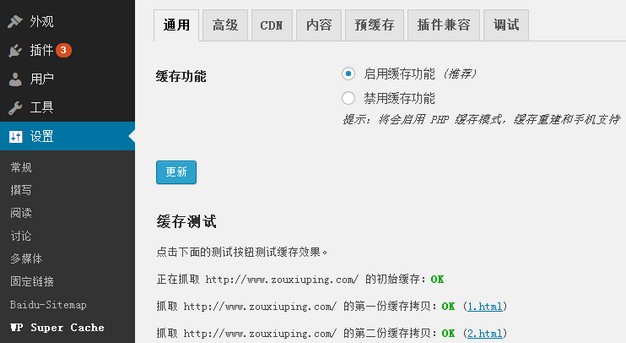 Cache Test
Advanced Settings: You can configure various caching options according to your needs. If you are using an Apache server, the mod_rewrite caching mode is the best choice. If you are using an Nginx server, which does not support mod_rewrite caching, the PHP caching mode is a universal option that can achieve good results. Refer to the screenshot below for relevant settings:
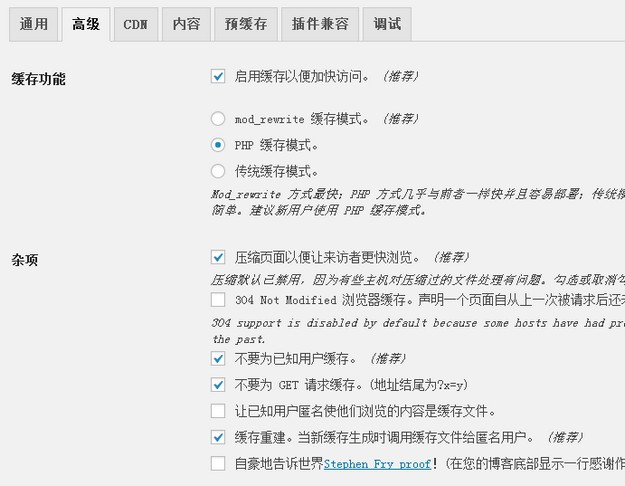 WP Super Cache Advanced Settings
Please note that after using this plugin, changes made to your website may not display immediately. You will need to go to Settings > Content and delete the expired cache. This plugin is recommended if your website's server is located abroad or if you have a large number of articles.