Gate U Card and USD Bank Account Guide: Paying for OpenAI and ChatGPT
Gate is an established cryptocurrency exchange founded in 2013, primarily used for trading digital assets like Bitcoin and USDT. With a large user base and a wide variety of coins, it has recently launched the Gate U card, allowing users to spend their USDT balance for online subscriptions such as ChatGPT and OpenAI. This article explains how to register for a Gate account, activate the U card, and open a USD bank account.
What Can Gate Exchange Do?
- Provides 2 U cards with no address proof required and low application thresholds.
- Allows application for a USD bank account under your own name (fee is $1/month or $12/year for balances under $1,000).
- Enables trading of cryptocurrency assets like Bitcoin, ETH, and USDT.
- Supports stock investment trading including HK stocks, US stocks, Korean stocks, Japanese stocks, Taiwanese stocks, and US options.
Registering for Gate
Before registration, prepare the following documents:
- ID card, passport, or driver's license (any one is sufficient for real-name verification).
- A commonly used mobile phone number (supports domestic Chinese numbers).
- A commonly used email address.
Gate Exclusive Registration Link: https://www.gate.com/zh/share/VAMVULHWVA | Invitation Code:
VAMVULHWVA(usually does not need to be filled separately)
Important Notes During Registration:
- Typically, you do not need to use a proxy, especially avoid using a US proxy, as restrictions vary by region.
- Residence Country/Region: Select China (other regions are not guaranteed to qualify for the U card).
- Nationality: Select China.
- Real-name Verification: Accepts ID card, passport, or driver's license.
- Phone Binding: You can enter a domestic Chinese phone number.
Usually, the system completes automatic review within a few minutes.
Installing the Gate APP
The purpose of installing the Gate APP is to conveniently apply for the Gate U card and activate the Money account (personal USD bank account). Search for "Gate" in the app store, install, and log in.
- Apple App Store: https://apps.apple.com/us/app/gate-buy-btc-eth/id1294998195
- Google Play: https://play.google.com/store/apps/details?id=com.gateio.gateio
Note: If Gate cannot be found in the domestic Apple App Store, switch to an overseas app store to search and install!
Applying for the Gate U Card
Currently, the Gate U card application fee is waived (original price was 10 USDT). Before applying, you must make a minimum first deposit of 10 USDT into your balance (this is for spending, not a fee). Therefore, transfer at least 10 USDT to your account before applying.
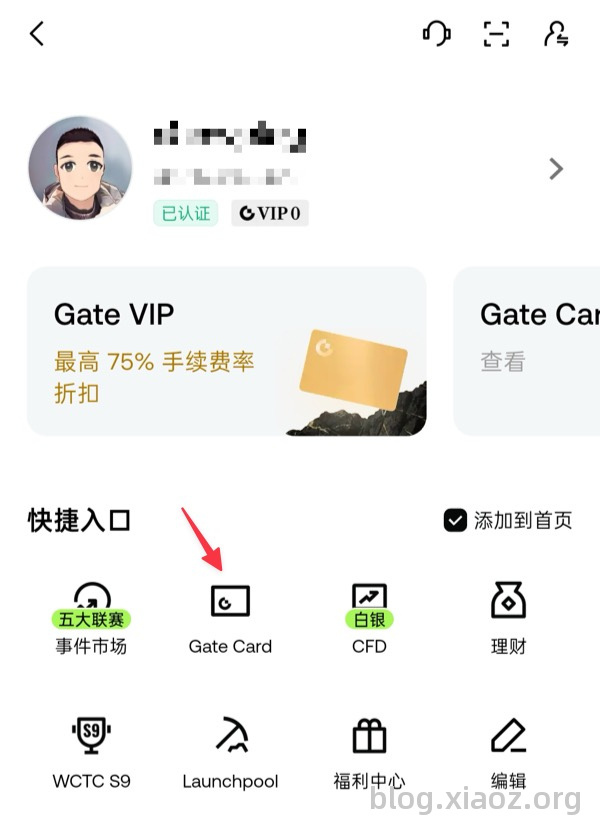
After logging into the APP, tap the avatar in the top left corner to go to the homepage, then find Gate Card to apply.
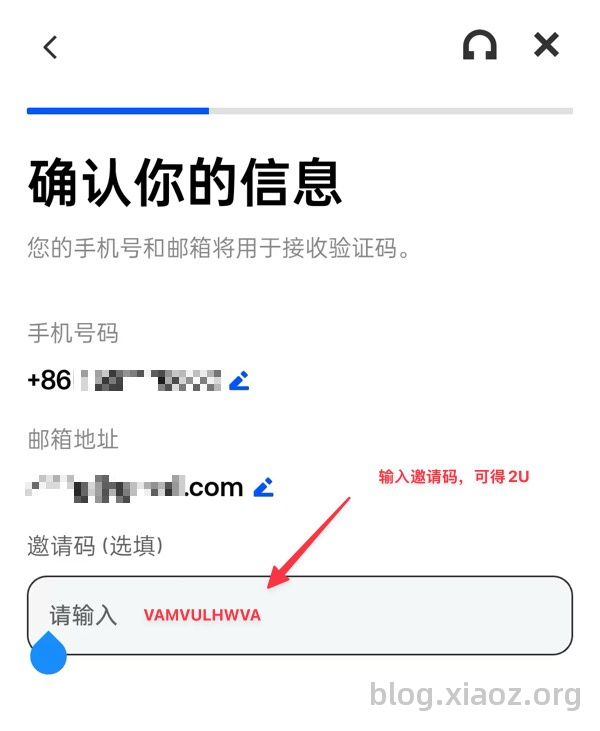
When applying for the U card, remember to fill in the blogger's exclusive invitation code: VAMVULHWVA. After filling in the code, you will receive a $2 reward if you spend $100 within a month; without the code, there is no reward!
Next, you will be asked to complete a questionnaire regarding work and income. Fill it out truthfully. Then, proceed to the billing address section. Since China is not listed, select Hong Kong or another country. It is best to find a real address via Google Maps rather than making one up. The blogger used a Hong Kong billing address.
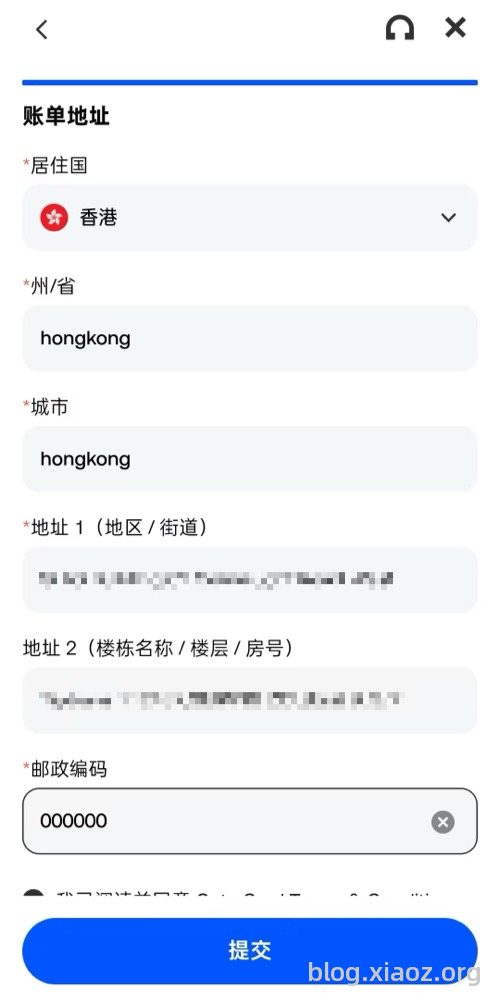
Tip: Feel free to use addresses from Google Maps; address proof is not required!
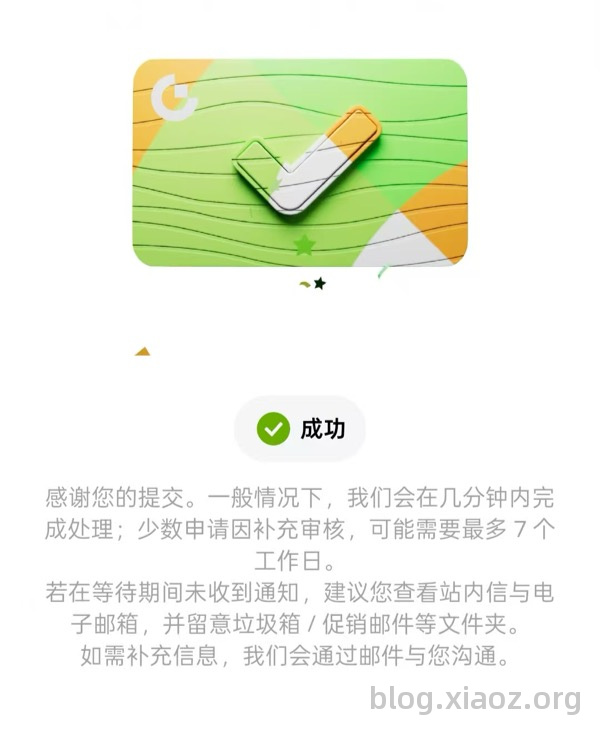
After submission, wait for the system to automatically approve and activate the card. In most cases, this takes a few minutes, but in some instances, it may take up to 7 days. Please be patient.
Using the Gate U Card
Card Origin
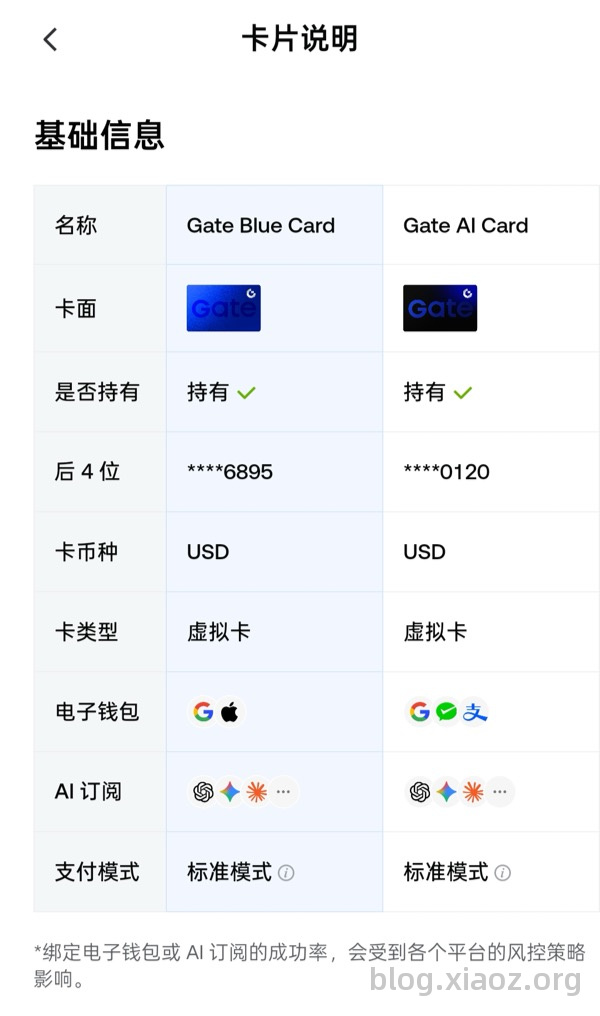
The virtual card BIN issued to the blogger starts with 4138820. Different tools show inconsistent results, with some indicating Lithuania and others Austria. It is likely a European card.
Usage Scenarios
The blogger tested that it can be bound to Alipay and supports 3DS verification. Additionally, the Gate Card page indicates it can be used for payments to OpenAI, ChatGPT, Claude, etc.
Blogger Tip: If you are using this for payment scenarios like OpenAI, ChatGPT, or Claude, ensure your IP address is clean, otherwise, payment rejection may still occur!
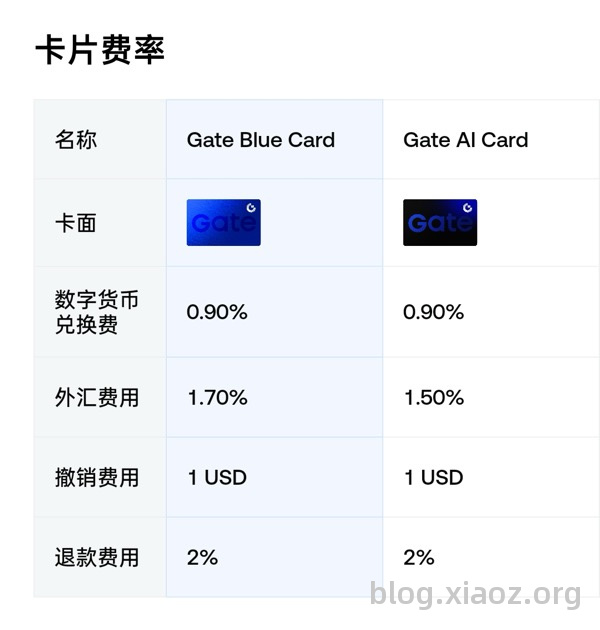
Card Fees
One Gate user can open 2 virtual cards. Fee details are as follows:
Opening a Personal USD Bank Account
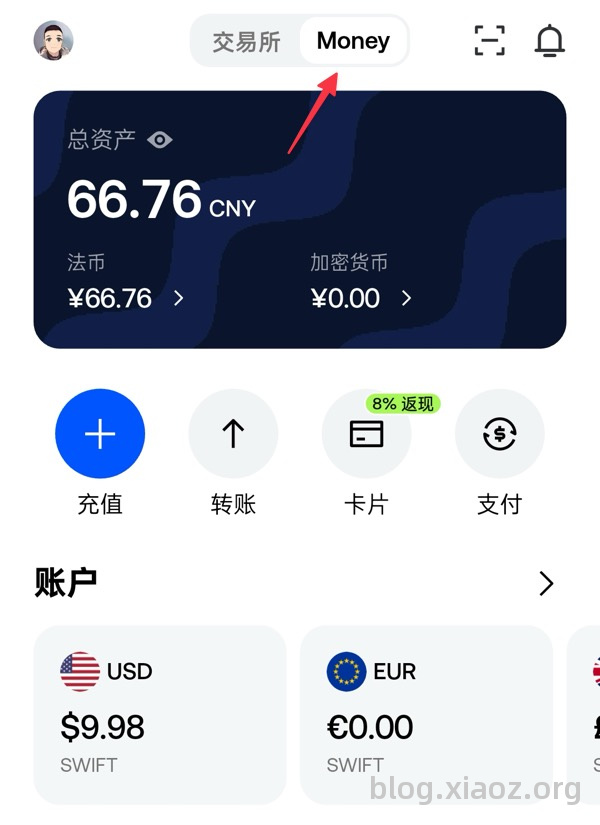
Gate also offers a personal USD bank account under your own name. The fee is $1/month (waived if assets exceed $1,000). To open it, find Money at the top of the APP.
However, this USD account has certain limitations:
- Only deposits from accounts with the same name are supported; non-same-name deposits are not allowed.
- USD withdrawals can only be made via SWIFT, with a fee of $25 per transaction.
This USD account is somewhat useful but limited. It is recommended to open it only if needed; otherwise, it is not suggested.
Other Features
Besides basic cryptocurrency trading, Gate provides functions for investing in US and HK stocks. The blogger has not further explored these features, so interested users can try them out themselves.
Note: Investment involves risk; please operate with caution!
Conclusion
Overall, the Gate U card has a low application threshold and is suitable for users needing to pay for subscriptions like ChatGPT and OpenAI. The USD bank account should be opened based on individual needs. When operating, ensure you fill in a real billing address, keep your IP clean, and be aware of related fees and investment risks.
Gate Exclusive Registration Link: https://www.gate.com/zh/share/VAMVULHWVA
Gate Card Exclusive Invitation Code:
VAMVULHWVA