Cloudflare Workers Deployment Guide: Using Wrangler Commands
Recently, xiaoz developed an HTTP email sending service. The project itself is not complex, and for convenience, the plan was to deploy it to Cloudflare Workers. Although a few small issues arose during the process, they were quickly resolved with the help of AI. Since this was the first time using the wrangler command for deployment, there were some initial hurdles. This article records the experience.
What is Wrangler?
Wrangler is an official Cloudflare tool that allows you to deploy and manage Cloudflare Workers directly from the command line with a single click. If you are developing applications compatible with Cloudflare Workers, the Wrangler tool is almost indispensable.
Installing Wrangler
You can install Wrangler using either bun or pnpm with the following commands:
# Install wrangler using bun
bun install -g wrangler
# Install wrangler using pnpm
pnpm install -g wrangler
After installation, run wrangler --version to check the version number.
Cloudflare Workers Project Configuration
When adapting a project for Cloudflare Workers, a configuration file named wrangler.jsonc will exist in the root directory. It may contain the following information:
{
  "$schema": "node_modules/wrangler/config-schema.json",
  "name": "zsend",
  "main": "src/index.ts",
  "compatibility_date": "2026-05-17",
  "compatibility_flags": ["nodejs_compat"],
  "d1_databases": [
    {
      "binding": "DB",
      "database_name": "zsend",
      "database_id": "29364a4e-08d4-420f-a06f-f8db95041113"
    }
  ],
  "dev": {
    "ip": "0.0.0.0",
    "port": 8000
  }
}
name: The name of the Workers project, used as an identifier in the Cloudflare dashboard and for project recognition during local development.main: The path to the entry file, which is the main script file for the Worker (heresrc/index.ts). Wrangler will bundle and deploy this file.compatibility_date: Specifies the date for the Worker runtime compatibility, enabling new features or fixes released after that date to ensure consistent behavior.compatibility_flags: Explicitly enables certain experimental or specific version runtime features. For example,["nodejs_compat"]enables the Node.js compatibility layer.d1_databases: Configures the Cloudflare D1 database associated with the project; this is an array.dev: Configuration options for the local development environment (wrangler dev).
Environment variables can also be configured in wrangler.jsonc, but it is generally not recommended to set them this way. Doing so is insecure and unsuitable for open-source code distribution.
Using Wrangler Commands
To deploy a Workers project, you need to use Wrangler commands to complete login authorization. If your operating system has a graphical interface, you can complete this directly with wrangler login.
However, in a Linux terminal without a graphical interface, you can complete authentication via the API method using the following commands:
# Set API authentication
echo 'export CLOUDFLARE_API_TOKEN=xxx' >> ~/.bashrc
# Make it effective
source ~/.bashrc
Tip: The API Token must be created in the Cloudflare dashboard and granted the corresponding permissions!
You can then use wrangler whoami to check if the authentication was successful.

Setting Project Parameters
As mentioned earlier, it is generally not recommended to configure parameters in wrangler.jsonc. The recommended approach is to use the wrangler secret command. For example, if you want to set a TOKEN environment variable, use the following command:
# Create a new TOKEN environment variable
wrangler secret put TOKEN
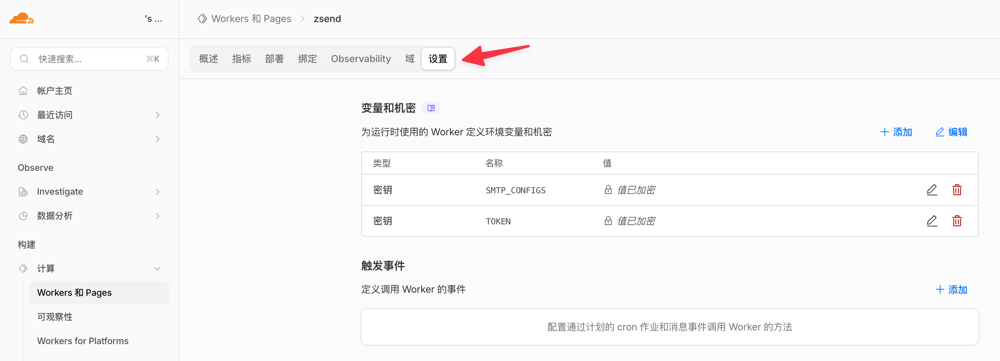
You can then use wrangler secret list to list all configured variables, or view them in the [Settings] section of the web interface.
Deploying the Project
Simply refer to the commands below:
# Deploy to the default environment
wrangler deploy

# List all versions
wrangler versions list

# Rollback to a specific version
wrangler rollback <version-id>

# View details of the currently deployed version
wrangler versions view <version-id>
For domain binding and other settings, please configure them directly in the Cloudflare Workers project dashboard.
Conclusion
Personally, I feel that the development and deployment process for Cloudflare Workers projects can be somewhat cumbersome, and it is easy to encounter pitfalls on the first try. However, the advantage is that Cloudflare Workers provides a generous free tier, allowing small projects to run at zero cost. What more could one ask for?