Configuring ThinkPHP on Nginx with Rewrite Rules
Recently, a company project was developed using the ThinkPHP framework. Enabling pathinfo on an Apache server posed no issues, but deploying it to an Nginx server revealed a problem: Nginx does not natively support pathinfo. Searching online for solutions revealed two main approaches:
- Modify ThinkPHP to run on Nginx.
- Modify Nginx to support pathinfo.
Personally, I found these methods somewhat cumbersome and not guaranteed to succeed. I later discovered a new, simpler, and faster method. First, add a rewrite rule:
location / {
    if (!-e $request_filename) {
        rewrite ^(.*)$ /index.php?s=$1 last;
        break;
    }
}
Next, change the URL model in the ThinkPHP configuration file to 2:
'URL_MODEL'=>2,
If deploying multiple projects, place each project in its own directory. For example, if the admin project is placed in the Admin directory, add another rewrite rule in Nginx:
location /Admin/ {
    if (!-e $request_filename) {
        rewrite ^/Admin/(.*)$ /Admin/index.php?s=$1 last;
        break;
    }
}
Finally, remember to change the URL model for that project to 2 as well.
Since the server is equipped with the AMH control panel, I will share how to use this method under AMH. The same logic applies to the LNMP one-click installation package.
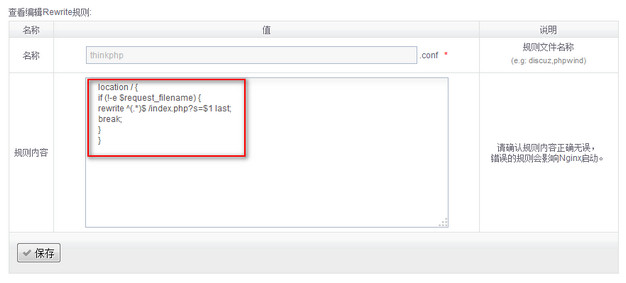
1. Manage Rewrite Rules in AMH In the AMRewrite module, you can manage all existing rewrite rules and add new ones. Copy the rule above and save it, as shown in the screenshot below:
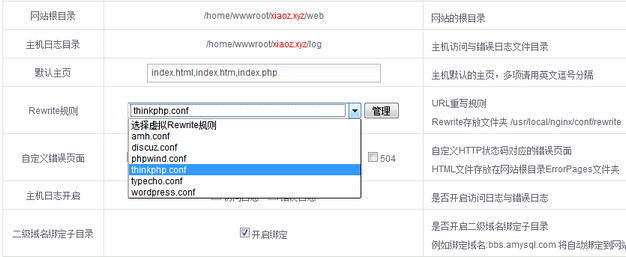
2. Apply the Rule to Virtual Hosts In the virtual host settings, select the rewrite rule you just added. At this point, ThinkPHP on the Nginx server will support pseudo-static URLs. Users with the LNMP one-click installation package may need to manually locate and modify these configuration files.