How to Set Keywords and Descriptions in WordPress
When your WordPress site is successfully built, a crucial task is setting the site's keywords and descriptions. This helps search engines identify your website's nature and improves SEO. Below are two methods to achieve this.
Method 1: Code Implementation
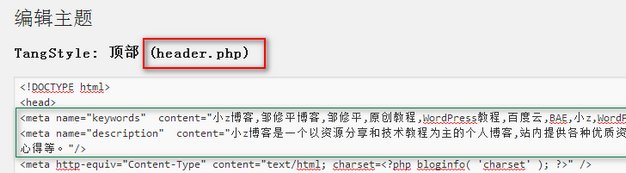
Locate the header.php file in your theme directory and add the following code after the <head> tag:
<meta name="keywords" content="Enter your website keywords here" />
<meta name="description" content="Enter your website description here"/>
Separate multiple keywords with commas (,). Keywords should generally not exceed 100 characters, and descriptions should not exceed 200 characters. The screenshot below shows the keyword settings for the XiaoZ blog for reference:
Method 2: Plugin Implementation
Most SEO plugins include features to set keywords and descriptions. Here, we use the All in One SEO plugin, which can be searched and installed from the backend.
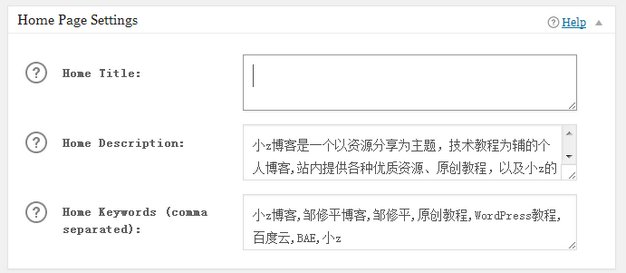
After installation and activation, a new All in One SEO button will appear in the backend. Click it and select General Settings to configure:
- Home Description: Enter your website description.
- Home Keywords (comma separated): Enter your website keywords, separated by commas.
Save your changes.
Note: Some themes come with built-in SEO functionality that allows you to set keywords and descriptions separately. If your theme has this feature, there is no need to use code or plugins to avoid duplicate settings.