How to Generate a QQ Space Music Direct Link Using Qiniu Cloud Storage
Qiniu Cloud Storage uses a distributed system architecture with multiple acceleration nodes across the country. More importantly, it offers 10GB of free storage and traffic. As far as I know, many site owners also use Qiniu Cloud Storage for static acceleration of their websites.
I won't go into too much detail about Qiniu's features, as there are many reviews and materials available online, along with detailed developer documentation from the official source. This article is primarily aimed at ordinary users, providing a simple tutorial. Let's first address a common question:
What is the difference between Qiniu Cloud Storage and ordinary cloud drives?
Answer: Qiniu Cloud Storage is mainly designed for developers, while ordinary cloud drives target the general public. Of course, ordinary users can also benefit greatly from using Qiniu Cloud Storage. In terms of speed, it feels excellent, and it allows you to generate your own unique subdomain. It supports static acceleration, building static blogs, and generating direct links for images and music—features that ordinary cloud drives do not offer. Although it may not be as convenient to operate as a cloud drive, its advantages remain undeniable. Below is an introduction to the method of generating a music direct link.
The benefit of this method is that you no longer need to search everywhere for QQ Space music links, nor do you have to worry about links becoming unavailable or loading slowly. You have complete control over your music. Let's get started:
First, register for a Qiniu account. Fill in the required information as prompted. Binding your mobile phone grants you 10GB of space, while not binding it limits you to 1GB. If you don't plan to do anything else, 1GB is sufficient.
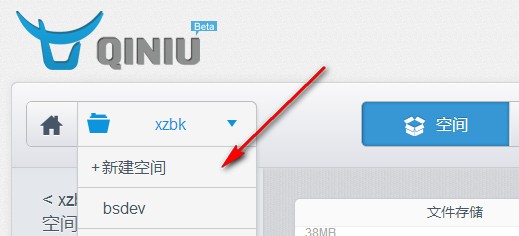
Click to create a new bucket on the left. This bucket is unique and cannot share a name with other users. Once created, your subdomain will be generated.
- After successful creation, select Content Management. You will see the upload button.
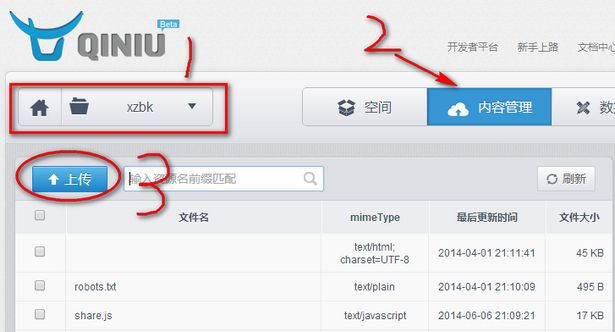
Locate the song you want to use as QQ Space background music on your local device and upload it. It is recommended to keep the file size between 3-6MB to avoid affecting loading speed.
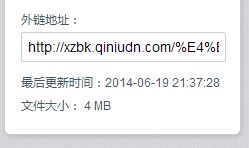
After uploading an MP3 song, select it, and you will see the generated link on the right side. This link can be used anywhere you like, including websites and QQ Space.
- If you want to set it as your QQ Space background music, it is very simple. You can refer to this article: Set QQ Space Background Music Without Green Diamond.
PS: If you encounter any issues during use, feel free to leave a message for me below! ^_^ Or add my personal WeChat ID: xiupingzou
Related Recommendations: