MinIO Alternative: Deploy High-Performance RustFS Object Storage Easily with Docker
Private object storage often uses MinIO, but recently xiaoz saw that MinIO's new version removed the web console function and changed the license. Commercial use of the latest version of MinIO may carry risks. At this time, there are generally two choices:
- Continue using the old version of MinIO:
minio/minio:RELEASE.2022-05-26T05-48-41Z - Look for other alternative software, such as: RustFS
This article will introduce how to deploy the RustFS object storage service using Docker to replace MinIO. Developers, operations personnel, or enterprises in need can refer to this.
About RustFS
RustFS is a high-performance distributed object storage software built with Rust. Like MinIO, it has a series of advantages such as simplicity, S3 compatibility, open-source features, and support for data lakes, AI, and big data. In addition, compared with other storage systems, it is built with the Apache license, offering a better and more user-friendly open-source license. Based on Rust, RustFS provides faster speeds and more secure distributed functions for high-performance object storage. —— Quoted from official introduction

RustFS open source address: https://github.com/rustfs/rustfs
RustFS Features
- High Performance: Built with Rust, ensuring speed and efficiency.
- Distributed Architecture: Scalable and fault-tolerant design, suitable for large-scale deployment.
- S3 Compatibility: Seamless integration with existing S3-compatible applications.
- Data Lake Support: Optimized for big data and AI workloads.
- Open Source: Adopting the Apache 2.0 license, encouraging community contribution and transparency.
- User-Friendly: Simple design, easy to deploy and manage.
Docker Deployment of RustFS
Next, we demonstrate how to deploy RustFS using Docker Compose on a single machine (note: for important production environments, cluster deployment is recommended). Create a docker-compose.yaml file with the following content:
version: '3'

services:
  rustfs:
    container_name: rustfs
    image: rustfs/rustfs:latest
    ports:
      - "9000:9000"
    volumes:
      - ./data:/data
    environment:
      - RUSTFS_ACCESS_KEY=rustfsadmin
      - RUSTFS_SECRET_KEY=rustfsadmin
      - RUSTFS_CONSOLE_ENABLE=true
      - RUSTFS_SERVER_DOMAINS=example.com
    restart: unless-stopped
Key parameter meanings are as follows:
RUSTFS_ACCESS_KEY: Can be simply understood as the administrator username, be sure to modify it yourself.RUSTFS_SECRET_KEY: Can be simply understood as the administrator password, be sure to modify it yourself.RUSTFS_CONSOLE_ENABLE: Enable WEB console.RUSTFS_SERVER_DOMAINS: RustFS server domain name.
Finally, enter docker-compose up -d to start, then visit the http://IP:9000 port to access the RustFS WEB server, select key login, and enter your set account and password to complete login.

Nginx Reverse Proxy
Production environments generally do not recommend logging in via IP + port. Usually, access is done via domain name after Nginx reverse proxy. The following Nginx configuration can be referenced:
server {
    listen 443 ssl http2;
    server_name xxx.com;

    # SSL certificate configuration (replace with your certificate path)
    ssl_certificate /xxx.crt;
    ssl_certificate_key /xxx.key;
    ssl_protocols       TLSv1.2 TLSv1.3;
    ssl_ciphers         HIGH:!aNULL:!MD5;

    # Allow special characters in headers
   ignore_invalid_headers off;
   # Allow any size file to be uploaded.
   # Set to a value such as 1000m; to restrict file size to a specific value
   client_max_body_size 0;
   # Disable buffering
   proxy_buffering off;
   proxy_request_buffering off;

location / {
      proxy_set_header Host $http_host;
      proxy_set_header X-Real-IP $remote_addr;
      proxy_set_header X-Forwarded-For $proxy_add_x_forwarded_for;
      proxy_set_header X-Forwarded-Proto $scheme;

      proxy_connect_timeout 300;
      # Default is HTTP/1, keepalive is only enabled in HTTP/1.1
      proxy_http_version 1.1;
      proxy_set_header Connection "";
      chunked_transfer_encoding off;

      proxy_set_header Upgrade $http_upgrade;
      proxy_set_header Connection "upgrade";

      proxy_pass http://IP:9000;
   }

}

# HTTP redirect to HTTPS
server {
    listen 80;
    server_name xxx.com;
    return 301 https://$host$request_uri;
}
The above configuration comes from the official: https://github.com/rustfs/rustfs/issues/374. If not configured according to the official configuration, login may fail after reverse proxy!
Basic Usage
Backend Interface
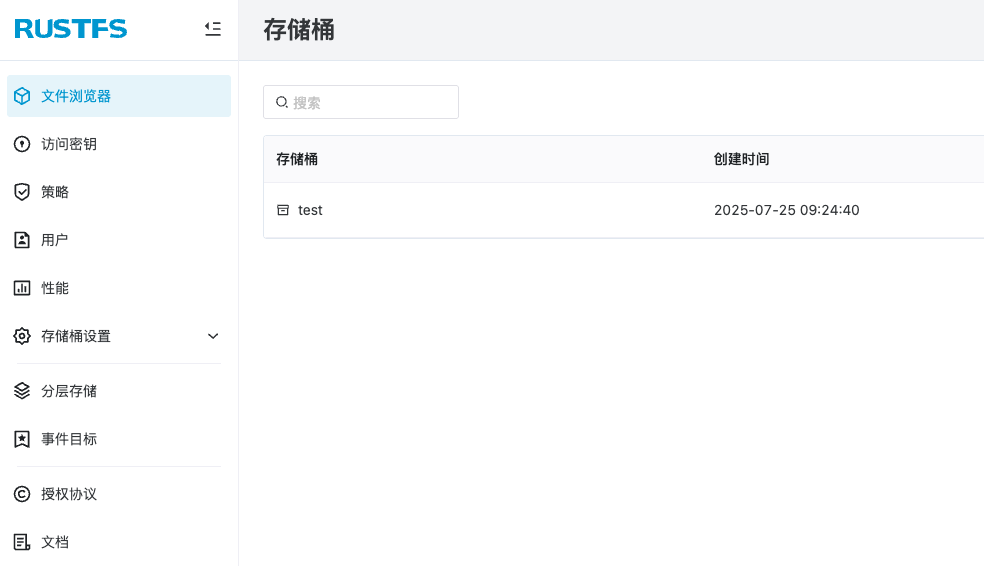
The WEB interface provided by RustFS is simple and easy to use, and supports Chinese and English by default.
Create Bucket
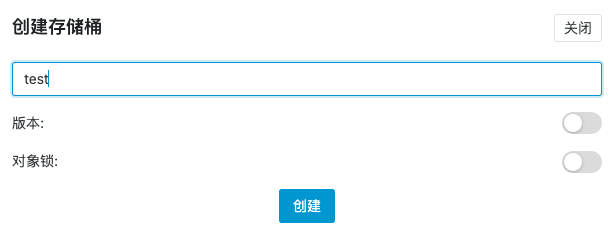
In the [Bucket Interface Top Right - Create Bucket - Enter Bucket Name], choose whether to enable version control and object lock according to your needs.
Object Management
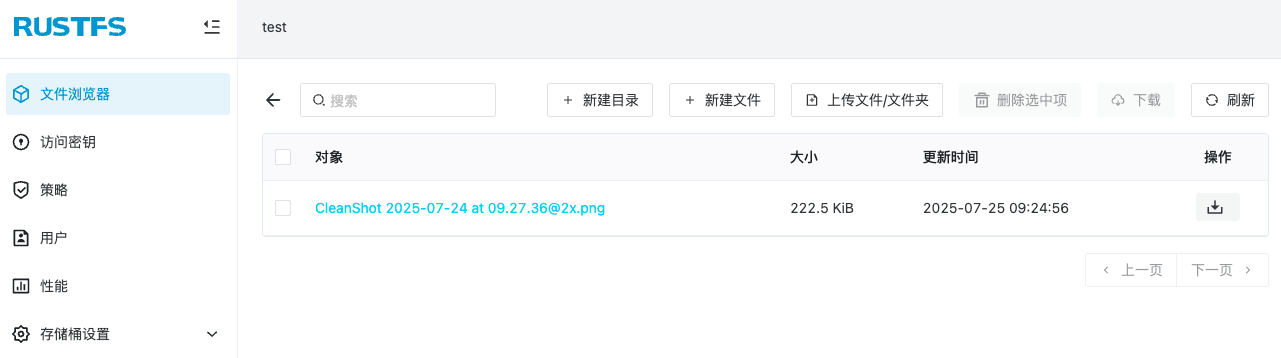
In the file browser, you can perform basic management operations on file objects (preview and delete), and also create new directories and upload files.
Advanced Usage
Other advanced functions can be explored by everyone. Personally, I think the WEB interface provided by RustFS is more user-friendly than MinIO's WEB interface.
Tips: RustFS is fully compatible with the S3 protocol, so you can use any S3 client to operate and manage RustFS.
Conclusion
After the MinIO new version license change, RustFS has become an ideal alternative solution — developed based on Rust high performance, compatible with S3 protocol, and adopting a friendly Apache open-source protocol, providing a better choice for private storage.
RustFS official website: https://rustfs.com/