How to Close Your OCBC SSA Account: A Step-by-Step Guide
In a previous article, Xiaoz shared a detailed guide on opening an OCBC account and applying for a debit card. OCBC typically opens two accounts by default: the SSA (Statement Savings Account), which is a single-currency account in Singapore Dollars (SGD), and the GSA (Global Savings Account), a multi-currency account excluding SGD. The SSA account carries relatively high management fees.
About OCBC Account Management Fees
- Statement Savings Account (SSA): Free for the first year. If the balance is below 20,000 SGD in the second year, a fee of 10 SGD/month is charged.
- 360 Account: Free for the first year. If the balance is below 3,000 SGD in the second year, a fee of 2 SGD/month is charged.
- MSA Account: Free for the first year. If the balance is below 500 SGD in the second year, a fee of 2 SGD/month is charged.
- GSA Account: Currently, no management fees have been observed.
Closing the SSA Account
The SSA account is free for the first year. If your balance is less than 20,000 SGD, it is recommended to close the account within one year to avoid management fees. Before closing, it is advisable to open an MSA or 360 account; otherwise, you will be unable to send or receive SGD in the future. Below is a guide based on Xiaoz's personal experience.
- Initially, I emailed via the OCBC app to request closing the SSA account. Customer service informed me that the account would automatically close after 6 months if the balance remained at 0. I followed this advice.
- After 7 months, I discovered the SSA account had not closed automatically. I emailed customer service again to request closure.
- This time, customer service stated that the SSA account owed 10 SGD in management fees and required payment before closure.
- I attempted to have the 10 SGD deducted from my 360 account to cover the SSA fee, but this was rejected.
- Finally, after paying the 10 SGD management fee directly into the SSA account, the account was successfully closed.
This experience highlights that OCBC customer service can be unprofessional, with inconsistent information provided by different agents. Therefore, do not assume all customer service responses are accurate.
OCBC SSA Account Closing Guide
- Preparation: Before closing, apply for an MSA or 360 account.
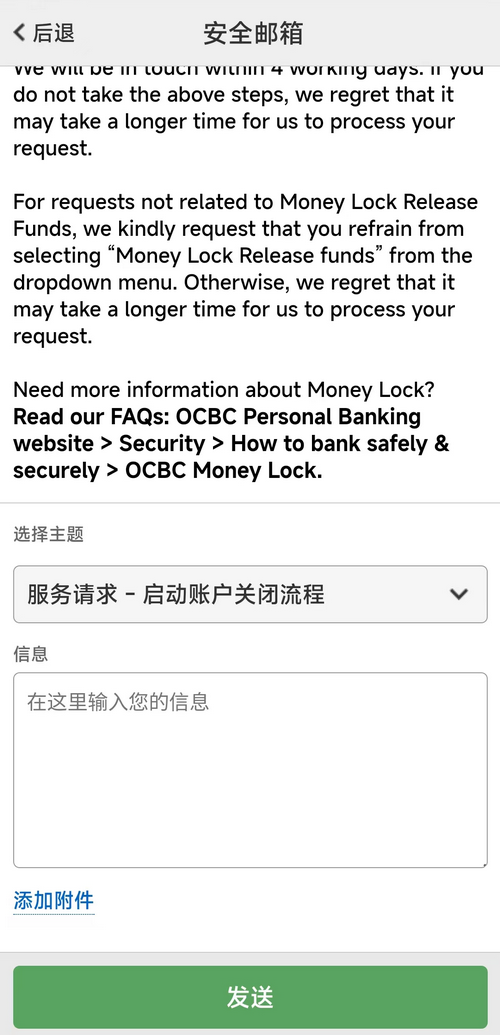
- Access Secure Mail: In the OCBC app, navigate to Secure Mail.
- Select Topic: Choose Service Request - Initiate Account Closure Process.
- Submit Request: Write the request in English to close the SSA account, including the SSA account number to prevent errors.
- Handle Inaccurate Advice: If customer service claims the account will auto-close in 6 months with a zero balance, ignore this advice. Wait a while and submit another closure request to potentially reach a different agent.
- Fee Warning: If your balance is below 20,000 SGD, close the SSA account within the first year. Otherwise, you may be required to pay outstanding management fees before the account can be closed.
Below is a screenshot showing the location of the Secure Mail feature:
Important Notes:
- OCBC Secure Mail typically takes 5 working days to respond, and the process can be slow.
- The Secure Mail function can be unreliable; sometimes submissions fail due to special characters or content length. Try removing symbols or shortening the text if you encounter issues.
Note: Xiaoz has verified that a 360 account with a balance of 0 for 6 consecutive months will automatically close. However, the SSA account will NOT auto-close under the same conditions!
Conclusion
The method above for closing the SSA account has been personally tested and proven effective. Before closing your SSA account, ensure you have applied for an MSA or 360 account to manage SGD transactions. Remember that maintaining a zero balance in the SSA account does not trigger automatic closure after 6 months; you must actively request closure to avoid management fees.
If you have other questions, feel free to leave a comment and discuss to help others avoid pitfalls.
TG Card Community: Join the group for discussion: https://t.me/usecardone