Xiaomi Watch S3 eSIM Review: Expectations vs. Reality
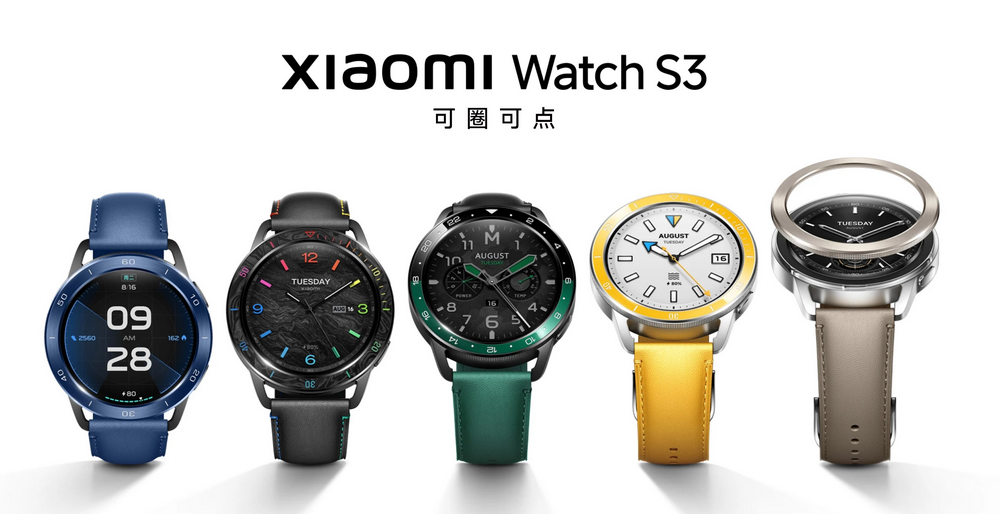
I have been using my Amazfit GTR 2 for over two years. Recently, Xiaomi launched the Xiaomi Watch S3 eSIM edition. To better integrate with my Xiaomi ecosystem at home, I decided to purchase the Xiaomi Watch S3 eSIM edition. Below is my share of the actual experience; let's take a look at its performance and whether it is worth buying.
Purchase
The Xiaomi Watch S3 comes in two versions: the standard edition (799 yuan) and the eSIM version. I chose the eSIM version, priced at 999 yuan.
Purchase link: https://u.jd.com/Zz4pxJK
My Expectations and Disappointments
Before purchasing, I thought:
- The eSIM version supports any carrier (including foreign carriers).
- Xiao Ai can be used independently.
- Mi Home can be used independently.
- TickTick can be used independently.
- Baidu Maps can be used independently.
The actual situation is:
- eSIM: Only supports China Unicom.
- Xiao Ai: Must be connected via Bluetooth to the phone.
- Mi Home: Must be connected via Bluetooth to the phone.
- TickTick: Must be connected via Bluetooth to the phone and have the TickTick app installed.
- Baidu Maps: Relies on the phone.
As the saying goes, the greater the expectation, the greater the disappointment. None of the features I expected were realized. I completely fail to understand the point of the eSIM version. Is it just to make me look foolish making phone calls with the watch?
Xiao Ai Cannot Be Used
After receiving the watch, I installed "Mi Fitness" (Xiaomi Health International Edition) via Google Play. After connecting Bluetooth and binding the device, I found that the watch's Xiao Ai voice input had no response.
I contacted customer service for help. They suggested restarting the watch. I tried restarting both the watch and the phone, but the issue persisted. The customer service representative then suggested I apply for after-sales testing. Did I just get unlucky?
However, I remained skeptical and suspected it was an app issue. Sure enough, after uninstalling "Mi Fitness" and reinstalling "Xiaomi Health" from the Xiaomi App Store, Xiao Ai worked normally. The conclusion is that "Mi Fitness" is not fully compatible with the Xiaomi Watch S3 eSIM edition, or the international version of the app has been stripped of certain features.
Attempt to Write a Foreign eSIM Card Failed
I activated a foreign eSIM card and generated a QR code. However, the eSIM management in "Xiaomi Health" displayed support only for China Unicom. I still decided to try scanning the code, but the eSIM provisioning failed. I tried repeatedly, but it still failed. I personally believe the hardware supports most eSIM carriers, but the software likely imposes restrictions. I had to give up.
The Bumpy eSIM Activation Experience
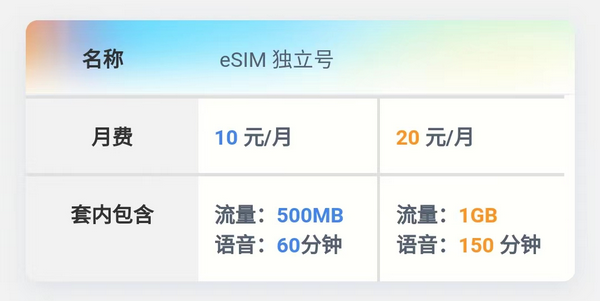
According to the app's prompts and guidance, the Xiaomi Watch S3 eSIM edition only supports China Unicom eSIM cards, supporting "One Number, Two Terminals" and "Independent Number." Since I did not have a China Unicom phone number, I chose the "Independent Number." The pricing is as follows:
I attempted to activate it independently via the China Unicom app, but the facial recognition check kept showing an error during submission. I tried changing networks, but the result was the same, making the independent activation process impossible.

I tried calling the China Unicom customer service hotline, but they could not solve the issue. They recorded a complaint and promised to contact me later. However, I didn't want to wait, so I went to a physical China Unicom business hall.
The offline eSIM activation required the following:
- ID card
- Mini-program "One Certificate Query" to check how many phone numbers are under my name
- Signing a commitment letter
- Taking a photo and recording a video
- Requirement to recharge 100 yuan
Foreign eSIM cards are already widespread, while domestic eSIM cards in China are not only not promoted but also very difficult to activate.
Unable to Install Apps Independently
The Xiaomi Watch S3 eSIM edition cannot independently install applications, nor can it uninstall pre-installed applications (it seems the standard edition allows independent app installation). It is currently unclear whether this is due to technical limitations or other considerations.
Conclusion
The Xiaomi Watch S3 eSIM edition did not meet my expectations. The eSIM card only supports China Unicom, and built-in apps must rely on a Bluetooth connection to the phone, unable to function independently. Functionally, the eSIM version offers no significant advantage over the standard edition. Unless future OTA updates allow apps to work independently without connecting to the phone, the eSIM version has little meaning.
That is the situation. Everyone should choose rationally based on their needs and actual circumstances. If your needs are simple, such as step counting, sleep monitoring, or payments, you can buy the standard edition. If your requirements are as demanding as mine, I suggest considering carefully before deciding to purchase.
Purchase link: https://u.jd.com/Zz4pxJK