iFAST Global Bank Account Opening Guide: Multi-Currency UK IBAN for Chinese Users
iFAST Global Bank (www.ifastgb.com) is a licensed bank headquartered in the UK, dedicated to providing globally connected banking services for clients, enterprises, and financial institutions worldwide. It is a subsidiary of iFAST Corporation, a fully FCA-regulated UK digital bank, and is covered by the Financial Services Compensation Scheme (FSCS) up to £85,000.
Before You Start
iFAST provides a UK IBAN account suitable for cross-border payments (non-commercial) and overseas investment purposes, and accepts applications from Chinese users. If you do not have specific needs, it is not recommended to apply.
If you plan to use the account for investment purposes, it is recommended to pair it with IBKR (Interactive Brokers): https://dwz.ovh/ibkr. If the link does not work, please use your own network tools.
Applying for iFAST
Before applying, you need to prepare the following:
- Chinese passport or ID card
- Frequently used email address
- Domestic mobile phone number
- Domestic bank statement (must show your name and address)
iFAST Global Bank application link: https://www.ifastgb.com/tellafriend/xiupingz6318
Register via the invitation link above. If you deposit at least £500 and keep the funds in the account for 3 months, you will receive an additional £5 bonus.
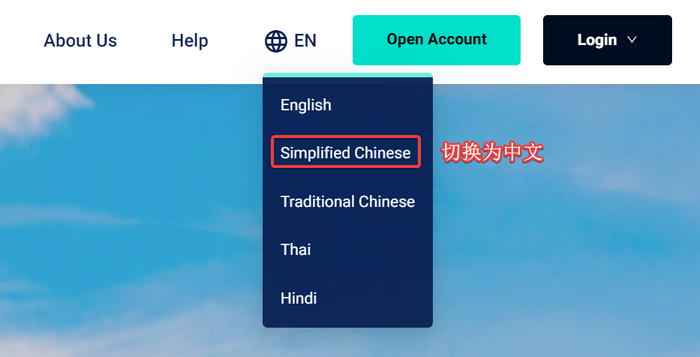
After opening the application link, you can switch to the Chinese interface by clicking the top right corner, as shown below.
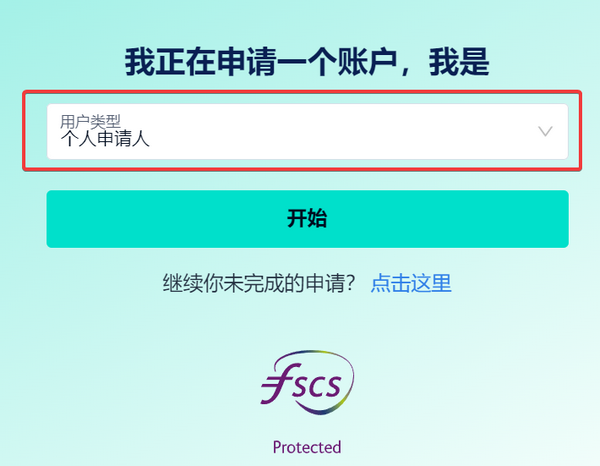
Select "Individual" for the user type.
The application for iFAST requires a significant amount of documentation. Since I have already completed the application, I cannot provide detailed screenshots for every step. However, ensure all information is filled out truthfully and pay attention to the following points:
- You will be asked to set a nickname and password; please remember them as they are required for future logins.
- I selected "Passport" as the ID type and uploaded a photo of my passport. Some users have reported that selecting an ID card is also acceptable.
- For the address, I entered my real domestic address and downloaded a PDF statement from China Merchants Bank as proof of address. However, iFAST indicated that the PDF format was not supported, so I uploaded a screenshot of the PDF instead.
- After submitting the documents, wait for the review, which typically takes about one week.
Timeline
Here is the timeline from "Application" to "Video Interview" to "Account Opened":
- 2023-07-16: Initiated the account opening application via the website
- 2023-07-17: Scheduled the video interview
- 2023-07-24: Received notification that the account was successfully opened
The entire process took about a week, which is relatively fast. Some users have reported waiting up to a month for approval. In general, if you pass the video interview, just wait patiently; approval within one month is considered normal.
Account Opened
Upon successful account opening, you will receive a UK IBAN number. This account supports multiple currencies. The default currencies are GBP (British Pound) and CNY (Chinese Yuan), but you can add more, including: Euro, US Dollar, Singapore Dollar, and Hong Kong Dollar.
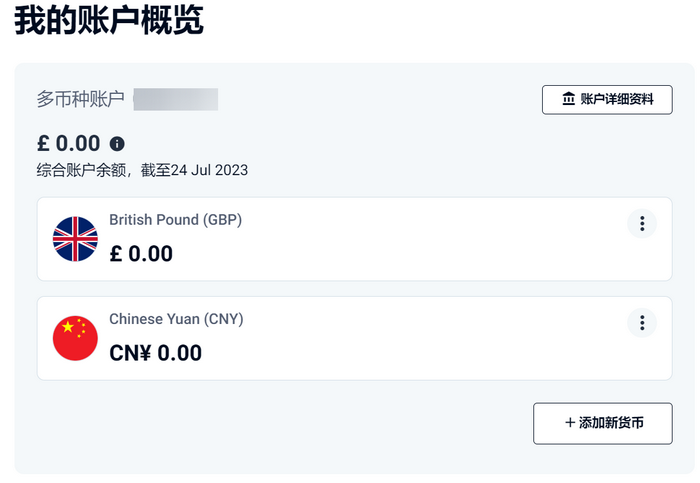
Click "Account Details" in the screenshot above to view your detailed IBAN information.
Funding and Activation
After opening the account, the first deposit must be made from an account in your own name. This may be challenging for users without overseas bank accounts.
Funding via WISE
I used WISE to deposit British Pounds into iFAST. Transfers are processed on business days.
- 15:32: Initiated transfer
- 17:10: WISE began processing
- 17:31: Funds arrived in iFAST
Since WISE does not process transfers immediately, this process took about 2 hours.
Cross-border Remittance Activation
If you do not have a WISE account or an overseas bank account, you can purchase British Pounds through your domestic bank and transfer them via cross-border remittance. However, fees may be high, so it is recommended to transfer a larger amount at once to save on fees.
Summary
- iFAST Global Bank has a low application threshold; currently, a full set of authentic Chinese documents can be used to apply.
After submitting documents, a video interview is required. You can request Chinese customer support in the email (no longer necessary).- Upon successful opening, iFAST provides a multi-currency UK IBAN account.
- iFAST does not yet offer virtual or physical debit cards for Chinese users.
- iFAST accounts have no annual fees or management fees, making them a good choice for backup accounts or for users without overseas accounts.
Additionally, I have created a Telegram group for discussion. If you have any questions, feel free to join: https://t.me/usecardone