Successfully Running ChatGLM-6B on Windows 10: A Detailed Guide
ChatGLM-6B is an open-source dialogue language model based on the General Language Model (GLM) architecture, supporting both Chinese and English. Optimized with techniques similar to ChatGPT, it underwent 1 trillion token bilingual training and incorporates supervised fine-tuning, self-consistency, and reinforcement learning from human feedback (RLHF), comprising 6.2 billion parameters.
Developed jointly by the KEG Laboratory at Tsinghua University and Zhipu AI, ChatGLM-6B utilizes model quantization technology, allowing local deployment on consumer-grade graphics cards with a minimum of 6GB VRAM at the INT4 quantization level.
Simply put, ChatGLM-6B can be understood as a locally deployed, slightly weaker version of ChatGPT.
After multiple attempts, xiaoz successfully ran the ChatGLM-6B dialogue language model on Windows 10. This article records and shares the entire process.
Prerequisites
This article is intended for researchers interested in artificial intelligence, requiring a certain foundation in programming and computer science. Familiarity with the Python programming language is highly recommended.
Hardware & Software Preparation
ChatGLM-6B has specific hardware and software requirements. Below are xiaoz's hardware specifications:
- CPU: AMD 3600
- Memory: DDR4 16GB
- GPU: RTX 3050 (8GB)
Software Environment:
- Operating System: Windows 10 (other OS versions are also supported)
- Git: Installed
- Python: Version 3.10
- NVIDIA Drivers: Installed
This article assumes you have a basic understanding of programming and computer systems. It will not cover the installation and usage of the above tools in detail. If you are unfamiliar with these, it is recommended to skip this guide.
Deploying ChatGLM-6B
ChatGLM-6B is open-sourced on GitHub: https://github.com/THUDM/ChatGLM-6B
First, clone the code using Git:
git clone https://github.com/THUDM/ChatGLM-6B.git
Next, I configured pip to use the Aliyun mirror source to facilitate the installation of Python dependencies:
pip config set global.index-url https://mirrors.aliyun.com/pypi/simple/
pip config set install.trusted-host mirrors.aliyun.com
Then, enter the ChatGLM-6B directory and install the required Python dependencies via the command line:
pip install -r requirements.txt
Next, download the model. Since xiaoz's graphics card is relatively weak, the 4-bit quantized model was selected. It is recommended to download the model beforehand, as the built-in Python script often fails or is slow.
The author hosts the model on the Hugging Face Hub. We need to download the model from there. For the 4-bit quantized model, the command is:
git clone -b int4 https://huggingface.co/THUDM/chatglm-6b.git
The pytorch_model.bin file is quite large. If the Git command is slow or fails, you can try manually downloading pytorch_model.bin and placing it in the local repository directory.
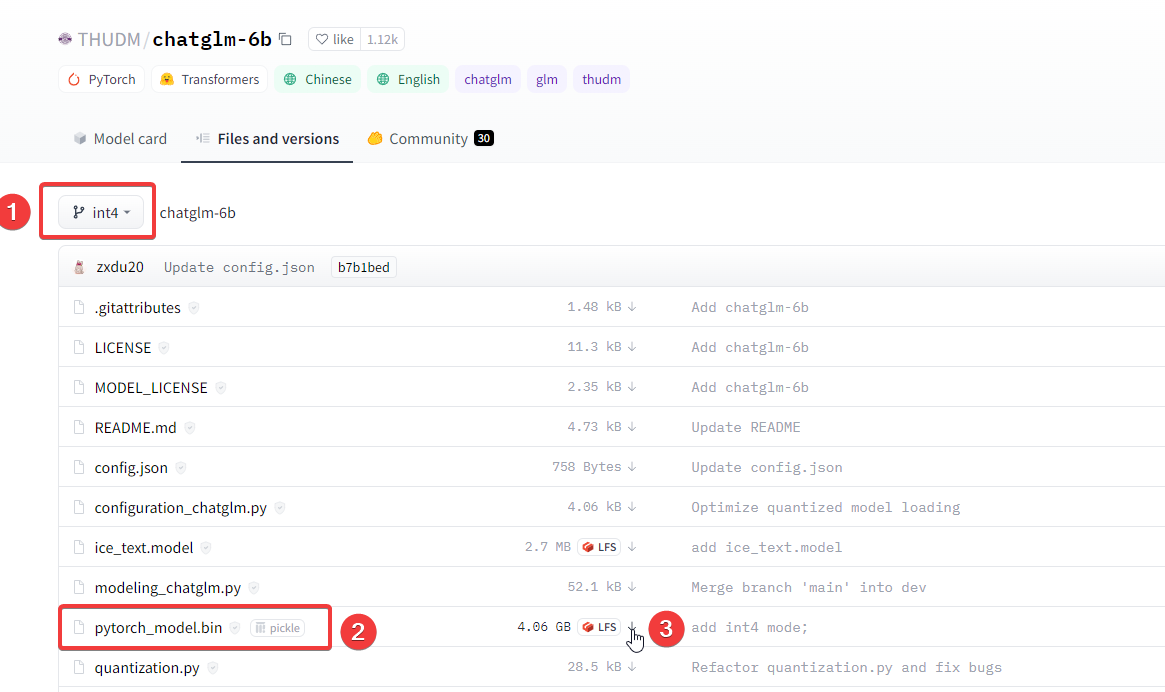
Note: There is a common pitfall here. You cannot download only the .bin file. You must download the .json, .py, and other files together into a directory. It is recommended to Git clone the entire repository and then manually merge the downloaded .bin file into the folder.
Running ChatGLM-6B
Enter the Python terminal to run the ChatGLM-6B model using the following commands:
# Specify the model location (the model cloned from Hugging Face Hub)
mypath = "D:/apps/ChatGLM-6B/model/int4/chatglm-6b"
# Import dependencies
from transformers import AutoTokenizer, AutoModel
tokenizer = AutoTokenizer.from_pretrained(mypath, trust_remote_code=True)
model = AutoModel.from_pretrained(mypath, trust_remote_code=True).half().cuda()
model = model.eval()
response, history = model.chat(tokenizer, "你好", history=[])
print(response)
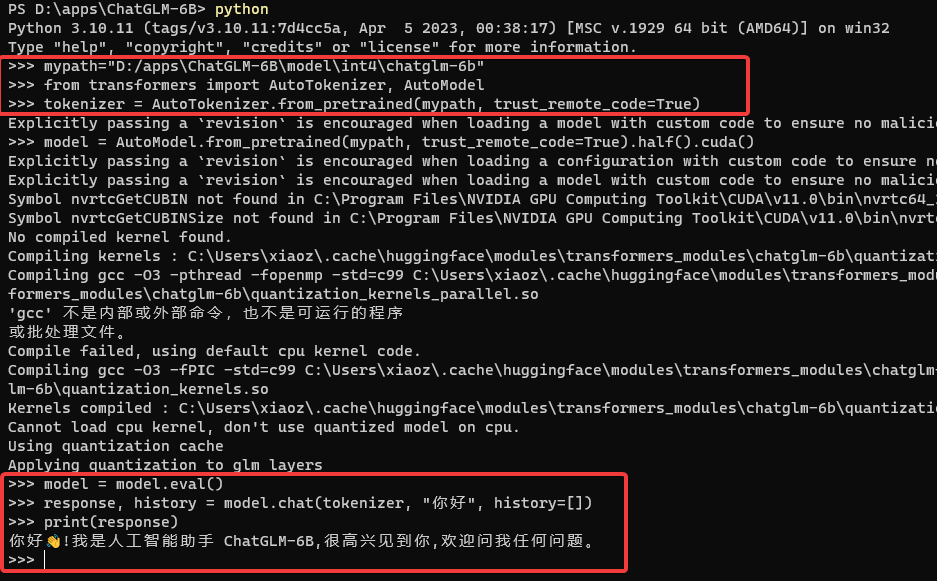
The process was not as smooth as expected. I encountered the following error:
Torch not compiled with CUDA enabled
After referring to this issue, I resolved it.
The solution is to first execute the command:
python -c "import torch; print(torch.cuda.is_available())"
If it returns False, it indicates that the installed PyTorch does not support CUDA. Then, execute the following command:
pip install torch==2.0.0+cu118 torchvision==0.15.1+cu118 -f https://download.pytorch.org/whl/cu118/torch_stable.html
After this, the error disappeared. Of course, everyone's hardware and software configuration is different, and the errors encountered may vary. Flexibility is key.
Command Line Testing
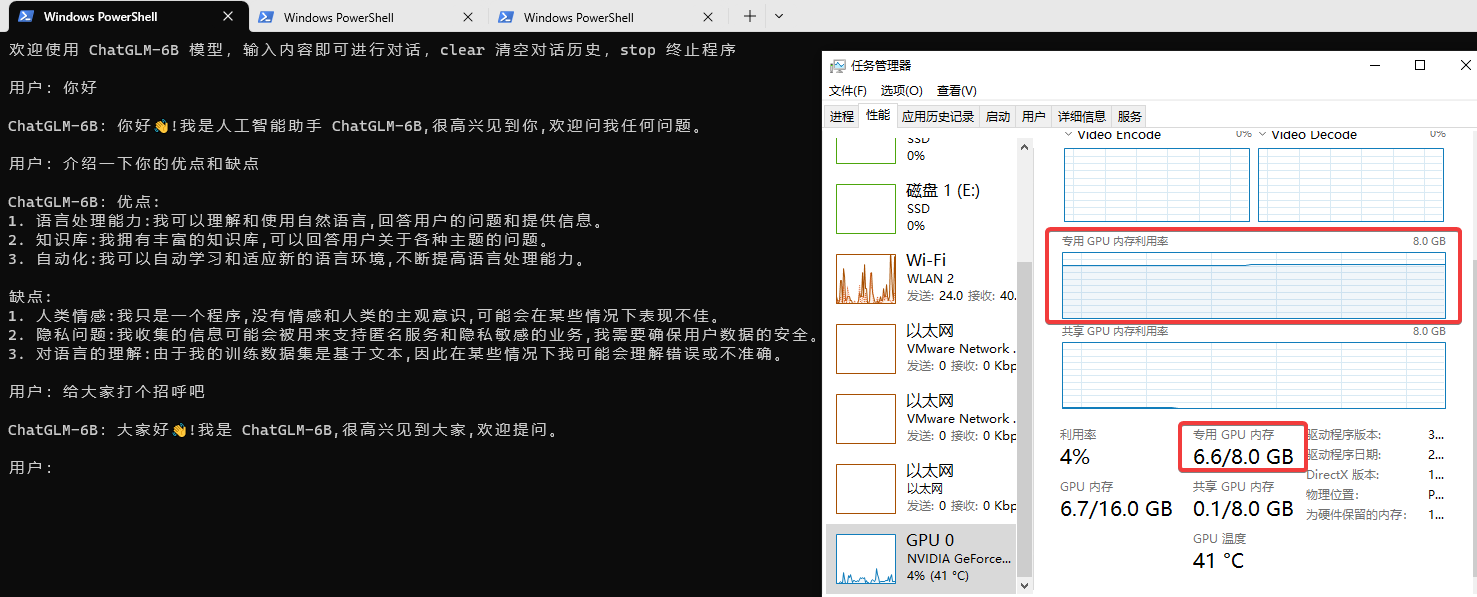
Running the 4-bit quantized model is still demanding; the 8GB VRAM of the RTX 3050 can easily be exhausted, and the response speed feels relatively slow. (Click the image to enlarge)
The official repository also provides WEB and API running methods. I encountered some errors with the WEB method and have not resolved them yet, but the CLI running method described above works perfectly.
Supplementary Notes
To check your installed PyTorch version, enter the following code in the Python interactive environment:
import torch
print(torch.__version__)
If the result shows x.x.x+cpu, it may lead to incompatibility. Refer to the "Torch not compiled with CUDA enabled" error solution above.
Re-checking the PyTorch version, if it displays +cuxxx, it indicates GPU support. The CPU-only version (+cpu) is not usable; only the GPU-supported +cu version is required.
Personal Impressions
I had a brief conversation with ChatGLM-6B and found the results satisfactory. While it is not as powerful as ChatGPT overall, ChatGLM-6B is open-sourced by a domestic development team and can run on consumer-grade graphics cards. I must give it a thumbs up and praise. I hope the team continues to work hard to catch up with ChatGPT.
ChatGLM-6B Open Source Address: https://github.com/THUDM/ChatGLM-6B