NetCup European VPS Review and Usage Guide with Coupon Codes
NetCup, founded in 2008, is a traditional German hosting provider with its own data centers. Its business scope is extensive, including VPS, dedicated servers, virtual hosting, and domain registration. The pricing is affordable, and the machine performance is excellent.

Registering a NetCup Account
NetCup accounts are strict; you must order a product to register. After registration, identity verification is required. The following documents have been successfully used for verification: foreign flight tickets, driver's licenses, and VISA bank cards. The support team approved these quickly. Other documents like passports, national ID cards, or bank statements might also work, so feel free to try.
NetCup Official Address: https://www.netcup.de/
Once the account is approved, the login address, username, and password will be sent to your email. Please check your inbox.
Coupons
The coupon redemption address is: https://www.netcup.com/en/checkout/cart. Below are 10 coupon codes worth €5 each, valid only for new users.
36nc15656769299
36nc15656769298
36nc15656769297
36nc15656769296
36nc15656769295
36nc15656769294
36nc15656769293
36nc15656769292
36nc15656769291
36nc15656769290
VPS Activation and Reinstallation
Select a suitable VPS plan on the page and follow the guide to place an order. The VPS will not be activated immediately; it requires customer service approval. Once activated, you will receive the login address, IP, and password. Interestingly, NetCup often installs a random operating system by default, not the one you want. Here is how to reinstall the system on NetCup.
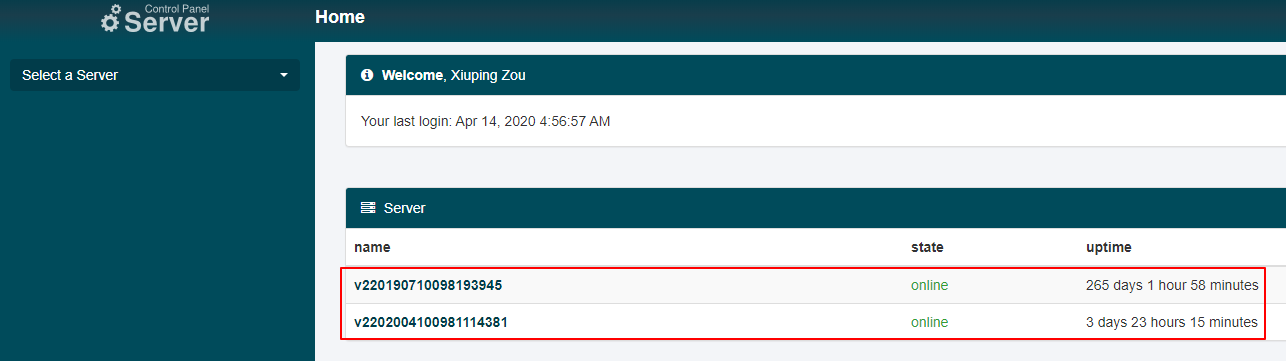
VPS management is handled via a separate panel at: https://www.servercontrolpanel.de/. After logging in, you can see all your servers, as shown below.
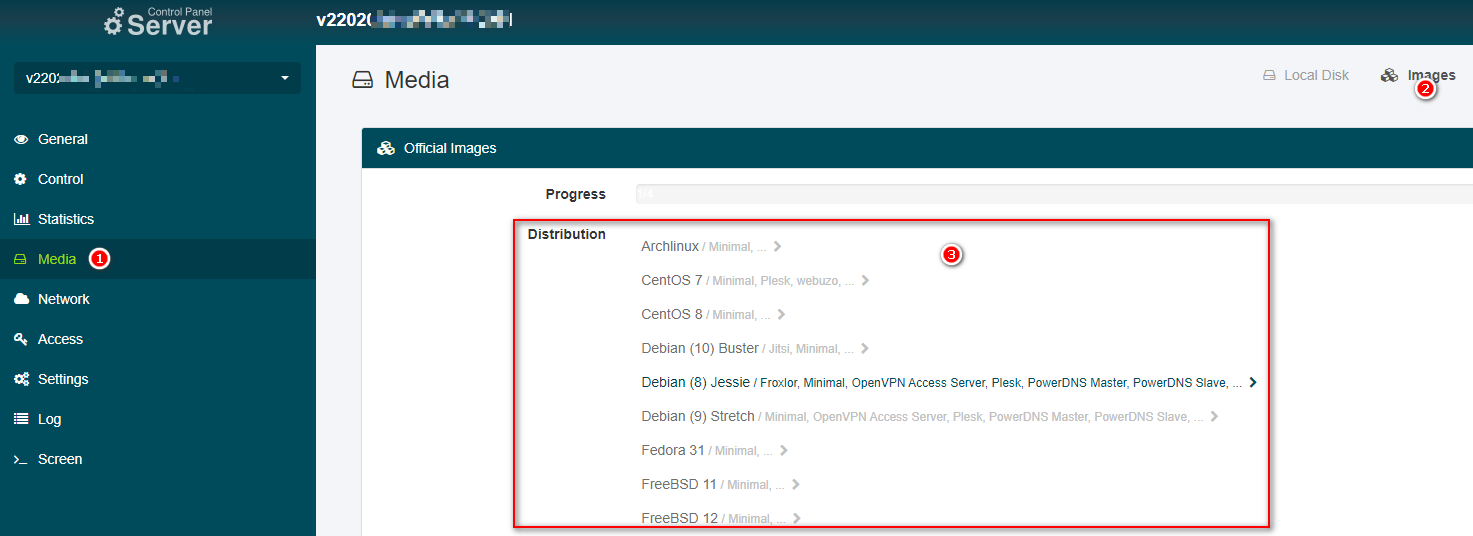
Click on the server you want to operate, find Media - Images on the left, and you will see various operating systems available. Select your preferred OS and follow the prompts to reinstall. After reinstallation, the account credentials will be sent to your email again.
Traffic Limits
Currently, NetCup VPS limits traffic to 40TB per month. If exceeded, the bandwidth is throttled to 200Mbps. Even with this limit, the speed still outperforms many competitors.
Technical Support
NetCup offers support via phone, forum, and email. However, considering practical situations, email support is usually the best choice. You need to submit a ticket via the form at: https://www.netcup.eu/kontakt/. After the customer service replies, you will receive an email notification and can continue communicating via email.
I/O and Download Tests
Below are the results from the bench.sh script. The average I/O speed reached 1284.7 MB/s, and the maximum download speed reached 110MB/s, confirming it is a Gigabit port. Note that different models and test times may yield different results.
----------------------------------------------------------------------
CPU model            : QEMU Virtual CPU version 2.5+
Number of cores      : 2
CPU frequency        : 1996.248 MHz
Total size of Disk   : 158.0 GB (5.8 GB Used)
Total amount of Mem  : 7964 MB (402 MB Used)
Total amount of Swap : 0 MB (0 MB Used)
System uptime        : 3 days, 22 hour 46 min
Load average         : 0.00, 0.00, 0.00
OS                   : CentOS 7.7.1908
Arch                 : x86_64 (64 Bit)
Kernel               : 5.6.4-1.el7.elrepo.x86_64
----------------------------------------------------------------------
I/O speed(1st run)   : 475 MB/s
I/O speed(2nd run)   : 1.7 GB/s
I/O speed(3rd run)   : 1.6 GB/s
Average I/O speed    : 1284.7 MB/s
----------------------------------------------------------------------
Node Name                       IPv4 address            Download Speed
CacheFly                        205.234.175.175         110MB/s
Linode, Tokyo2, JP              139.162.65.37           6.76MB/s
Linode, Singapore, SG           139.162.23.4            10.5MB/s
Linode, London, UK              176.58.107.39           103MB/s
Linode, Frankfurt, DE           139.162.130.8           123MB/s
Linode, Fremont, CA             50.116.14.9             10.7MB/s
Softlayer, Dallas, TX           173.192.68.18           9.94MB/s
Softlayer, Seattle, WA          67.228.112.250          11.0MB/s
Softlayer, Frankfurt, DE        159.122.69.4            115MB/s
Softlayer, Singapore, SG        119.81.28.170           9.46MB/s
Softlayer, HongKong, CN         119.81.130.170          8.51MB/s
----------------------------------------------------------------------
After installing BBR, during daytime testing on the Sichuan Telecom network, single-thread browser downloads reached nearly 2Mb/s. Network conditions vary by location; some areas may be faster, while others may have almost no speed.

Ping Test
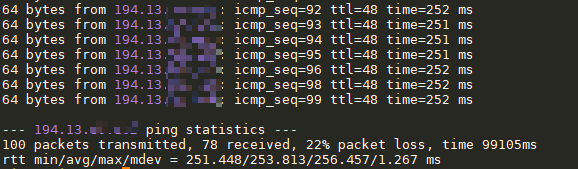
Sichuan Telecom ping test shows an average latency of 250ms, which is within the normal range for European VPS.
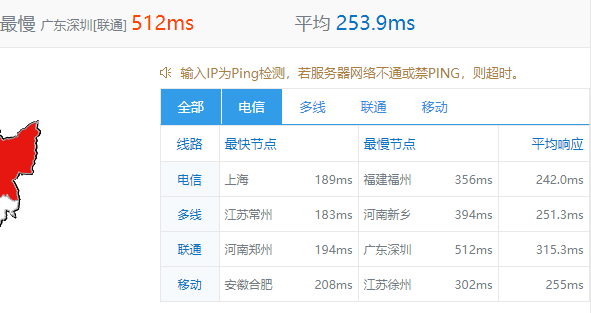
Superping tests also show an average latency of around 250ms.
Network Quality
Since the data center is in Europe, network quality to mainland China is not ideal. Do not have high expectations; consider using excellent CN2 machines for relay or reverse proxying.
Stability Test
I have a VPS Ostern S OST20 that has been running stably for 5 years with excellent stability.
Important Notes
NetCup bills include an additional 19% VAT. I attempted to apply for tax exemption, but customer service stated that only company accounts are eligible and require VAT proof, which seems difficult to obtain. Although my application was rejected, subsequent bills did not seem to include VAT, which was confusing.
If you plan to cancel NetCup services, you must do so at least 30 days in advance. If a bill is generated and not paid, it will result in a debt. It is said that NetCup may send a lawyer's letter in case of debt, so please be aware of this.
User Experience
Currently, I have two NetCup VPS instances, one of which has been running stably for 5 years without downtime. It is very stable, and the hardware allocation is generous with good performance. During the day, speeds in some areas are decent, but during peak evening hours, speeds seem to slow down. For European VPS, network conditions should not be expected to be perfect.
NetCup Official Address: https://www.netcup.de/