Hostry Singapore VPS Review: 1 Core 1GB for $5/Month with Unlimited Traffic
HOSTRY is a web hosting company established in 2006, with data centers located in the Netherlands, the USA, Luxembourg, and Russia. A month ago, I purchased a Singapore VPS; its performance is good and it is quite stable, so I am conducting a simple review.

Hostry Data Centers
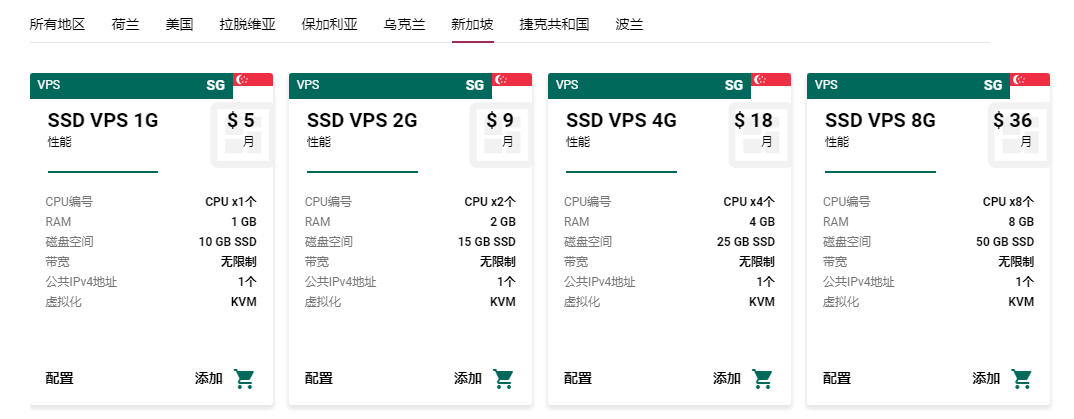
Hostry currently has 8 data centers (if I counted correctly): Netherlands, USA, Latvia, Bulgaria, Ukraine, Singapore, Czech Republic, and Poland. I found some test IPs online and discovered that the network in Singapore is relatively good. Below are the prices and configurations for the Singapore VPS. (Note: Hostry VPS data centers do not limit traffic.)
Payment Methods
- PayPal
- Credit Card
Purchase Address: https://hostry.com/
Disk I/O
The bench.sh average read/write speed is 384.7 MB/s.
----------------------------------------------------------------------
CPU model            : QEMU Virtual CPU version 2.5+
Number of cores      : 1
CPU frequency        : 2099.998 MHz
Total size of Disk   : 9.8 GB (6.5 GB Used)
Total amount of Mem  : 985 MB (220 MB Used)
Total amount of Swap : 1023 MB (103 MB Used)
System uptime        : 30 days, 13 hour 55 min
Load average         : 0.07, 0.19, 0.18
OS                   : CentOS 7.6.1810
Arch                 : x86_64 (64 Bit)
Kernel               : 5.2.1-1.el7.elrepo.x86_64
----------------------------------------------------------------------
I/O speed(1st run)   : 384 MB/s
I/O speed(2nd run)   : 417 MB/s
I/O speed(3rd run)   : 353 MB/s
Average I/O speed    : 384.7 MB/s
----------------------------------------------------------------------
Network & Bandwidth
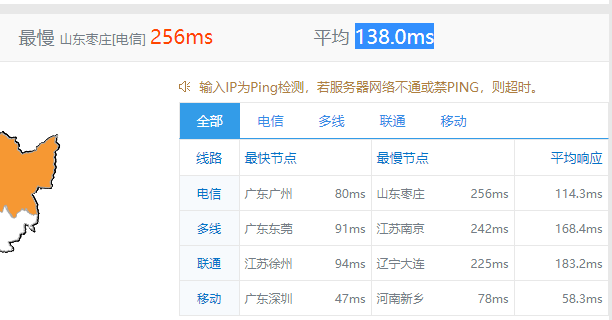
The SuperPing test shows an average latency of 138.0ms across the country.
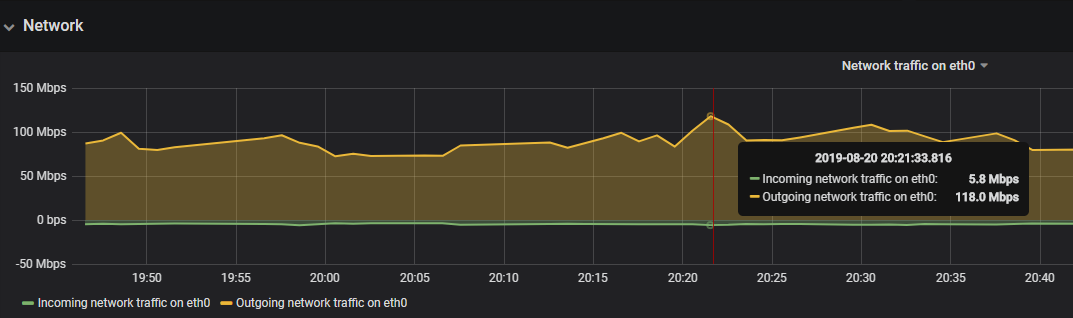
According to the Grafana monitoring, the upload bandwidth of the Hostry Singapore VPS can reach 100Mbps without issues.
However, the download speed is a bit disappointing. The fastest download speed is 2.52MB/s, which converts to approximately 20Mbps bandwidth. Therefore, Hostry may limit download speeds. However, for website hosting, we usually focus on upload bandwidth.
----------------------------------------------------------------------
Node Name                       IPv4 address            Download Speed
CacheFly                        167.88.158.176          2.52MB/s
Linode, Tokyo2, JP              139.162.65.37           918KB/s
Linode, Singapore, SG           139.162.23.4            2.54MB/s
Linode, London, UK              176.58.107.39           422KB/s
Linode, Frankfurt, DE           139.162.130.8           701KB/s
Linode, Fremont, CA             50.116.14.9             389KB/s
Softlayer, Dallas, TX           173.192.68.18           305KB/s
Softlayer, Seattle, WA          67.228.112.250          565KB/s
Softlayer, Frankfurt, DE        159.122.69.4            444KB/s
Softlayer, Singapore, SG        119.81.28.170           2.42MB/s
Softlayer, HongKong, CN         119.81.130.170          1.12MB/s
----------------------------------------------------------------------
Route Tracing
For China Telecom and China Unicom, the outbound route goes through Japan NTT and then to Singapore. China Mobile goes through Hong Kong to Singapore. I will not include screenshots for these, but there are official test IPs at the bottom for you to trace yourself.
All three networks return via Hong Kong. Below are the test data from the mping script.
---------------------------------------------------------------------------
【Sichuan Telecom】 - 61.139.2.69

traceroute to 61.139.2.69 (61.139.2.69), 30 hops max, 60 byte packets
 1  gw.ipv4.layer6.net (195.123.236.1)  1.56 ms  AS204957  Singapore itldc.com
 2  ip-103-239-220-233.basicbrix.com (103.239.220.233)  1.44 ms  AS64010  Singapore basicbrix.com
 3  ae1.edge1.sg2.basicbrix.com (103.239.220.21)  7.48 ms  AS64010  Singapore basicbrix.com
 4  unknown.telstraglobal.net (210.176.138.93)  0.85 ms  AS4637,AS10026  Singapore telstra.com
 5  i-92.sgpl-core02.telstraglobal.net (202.84.224.193)  18.20 ms  AS4637,AS10026  Singapore telstra.com
 6  i-15150.sgcn-core01.telstraglobal.net (202.84.140.165)  1.84 ms  AS4637,AS10026  Singapore telstra.com
 7  i-21151.hkhh-core02.telstraglobal.net (202.84.136.174)  32.93 ms  AS4637,AS10026  China Hong Kong telstra.com
 8  i-0-10-0-0.hkhh01.bi.telstraglobal.net (202.84.154.218)  34.68 ms  AS4637,AS10026  China Hong Kong telstra.com
 9  chinatelecom-peer.hkhh01.pr.telstraglobal.net (134.159.158.242)  81.97 ms  AS4637,AS10026  China Hong Kong telstra.com
10  202.97.60.170  77.99 ms  AS4134  China Guangdong Guangzhou Telecom
11  202.97.94.117  78.45 ms  AS4134  China Guangdong Guangzhou Telecom
12  202.97.90.169  79.90 ms  AS4134  China Guangdong Guangzhou Telecom
13  202.97.36.226  114.63 ms  AS4134  China Sichuan Chengdu Telecom
14  171.208.203.62  118.30 ms  AS4134  China Sichuan Chengdu Telecom
15  61.139.113.58  163.50 ms  AS4134  China Sichuan Chengdu Telecom
16  ns.sc.cninfo.net (61.139.2.69)  112.07 ms  AS4134  China Sichuan Chengdu Telecom

---------------------------------------------------------------------------
【Hebei Unicom】- 202.99.160.68

traceroute to 202.99.160.68 (202.99.160.68), 30 hops max, 60 byte packets
 1  gw.ipv4.layer6.net (195.123.236.1)  1.72 ms  AS204957  Singapore itldc.com
 2  ip-103-239-220-233.basicbrix.com (103.239.220.233)  2.06 ms  AS64010  Singapore basicbrix.com
 3  ae1.edge1.sg2.basicbrix.com (103.239.220.21)  0.98 ms  AS64010  Singapore basicbrix.com
 4  unknown.telstraglobal.net (210.176.138.93)  2.96 ms  AS4637,AS10026  Singapore telstra.com
 5  i-92.sgpl-core02.telstraglobal.net (202.84.224.193)  3.24 ms  AS4637,AS10026  Singapore telstra.com
 6  i-15150.sgcn-core01.telstraglobal.net (202.84.140.165)  6.17 ms  AS4637,AS10026  Singapore telstra.com
 7  i-15251.hkth-core02.telstraglobal.net (202.84.141.110)  42.84 ms  AS4637,AS10026  China Hong Kong telstra.com
 8  i-92.hkth12.telstraglobal.net (202.84.153.38)  34.66 ms  AS4637,AS10026  China Hong Kong telstra.com
 9  219.158.40.237  193.04 ms  AS4837  China Hong Kong Unicom
10  219.158.10.49  176.12 ms  AS4837  China Guangdong Guangzhou Unicom
11  219.158.20.221  196.01 ms  AS4837  China Guangdong Guangzhou Unicom
12  219.158.19.65  186.79 ms  AS4837  China Guangdong Guangzhou Unicom
13  219.158.115.78  202.64 ms  AS4837  China Beijing Unicom
14  202.99.160.106  188.78 ms  AS4837  China Hebei Shijiazhuang Unicom
15  61.182.175.194  205.77 ms  AS4837  China Hebei Shijiazhuang Unicom
16  221.192.35.2  198.90 ms  AS4837  China Hebei Shijiazhuang Unicom
17  202.99.160.68  211.86 ms  AS4837  China Hebei Shijiazhuang Unicom

---------------------------------------------------------------------------
【Anhui Mobile】 - 211.138.180.2

traceroute to 211.138.180.2 (211.138.180.2), 30 hops max, 60 byte packets
 1  gw.ipv4.layer6.net (195.123.236.1)  3.59 ms  AS204957  Singapore itldc.com
 2  ip-103-239-220-233.basicbrix.com (103.239.220.233)  3.08 ms  AS64010  Singapore basicbrix.com
 3  ae1.edge1.sg2.basicbrix.com (103.239.220.21)  2.24 ms  AS64010  Singapore basicbrix.com
 4  unknown.telstraglobal.net (210.176.138.93)  2.93 ms  AS4637,AS10026  Singapore telstra.com
 5  i-92.sgpl-core02.telstraglobal.net (202.84.224.193)  12.30 ms  AS4637,AS10026  Singapore telstra.com
 6  i-93.istt04.telstraglobal.net (202.84.224.190)  9.64 ms  AS4637,AS10026  Singapore telstra.com
 7  223.119.48.2  10.15 ms  AS58453  China Hong Kong Mobile
 8  223.118.3.109  37.02 ms  AS58453  China Hong Kong Mobile
 9  223.118.3.141  44.69 ms  AS58453  China Hong Kong Mobile
10  221.183.30.133  40.63 ms  AS9808  China Guangdong Guangzhou Mobile
11  221.176.24.57  45.14 ms  AS9808  China Guangdong Guangzhou Mobile
12  221.176.22.113  42.48 ms  AS9808  China Guangdong Guangzhou Mobile
13  221.176.18.6  77.17 ms  AS9808  China Anhui Hefei Mobile
14  221.183.19.126  74.55 ms  AS9808  China Anhui Hefei Mobile
15  120.210.247.1  75.49 ms  AS9808  China Anhui Hefei Mobile
16  *
17  ns1.ah.chinamobile.com (211.138.180.2)  72.23 ms  AS9808  China Anhui Hefei Mobile

---------------------------------------------------------------------------

This result was generated by mping: https://blog.xiaoz.org/archives/13044
Summary
The Hostry Singapore VPS is actually located in the ITLDC Singapore data center. I originally intended to purchase directly from the ITLDC official website but found that ITLDC does not offer low-spec machines. If you want to purchase low-spec machines, consider Hostry. The Hostry Singapore data center's outbound route for Telecom and Unicom goes through NTT, while Mobile goes through Hong Kong. All three networks return via Hong Kong. The outbound route is average, but the return route is acceptable. Hostry Singapore limits download speeds, but the upload speed can currently reach 100Mbps. Since Hostry does not limit traffic, it is suitable for use as a CDN node or for some high-traffic applications.
- Official Test Address: http://lg-sg1.hostry.com/
- Test IP: 195.123.237.74
Purchase Address: https://hostry.com/