ServerPoint Silicon Valley Data Center: A Simple Review
ServerPoint is a US hosting provider founded in 1998 and headquartered in Las Vegas, offering virtual hosting, cloud VPS, and dedicated servers. Recently, ServerPoint launched a special package on LowEndTalk with excellent cost-performance ratio, so I purchased one to conduct this simple review as a reference.
Registration & Purchase
Registering for ServerPoint
The ServerPoint registration address is: https://portal.serverpoint.com/signup. The interface supports Chinese. When registering, please note:
- Do not use a proxy.
- Use your real Pinyin name; do not fill it randomly.
- Make the address look as realistic as possible.
If you fill in information randomly, it may trigger risk control!
Purchasing the ServerPoint LowEndTalk Package
The purchase address for the ServerPoint LowEndTalk event package is: https://portal.serverpoint.com/public/cart/vs/letsep26e5 (this link has no AFF promotion). The validity period of the event is unclear; if you cannot purchase, the event has likely ended.
There are 6 data centers available, including locations in the US, Europe, and Singapore.
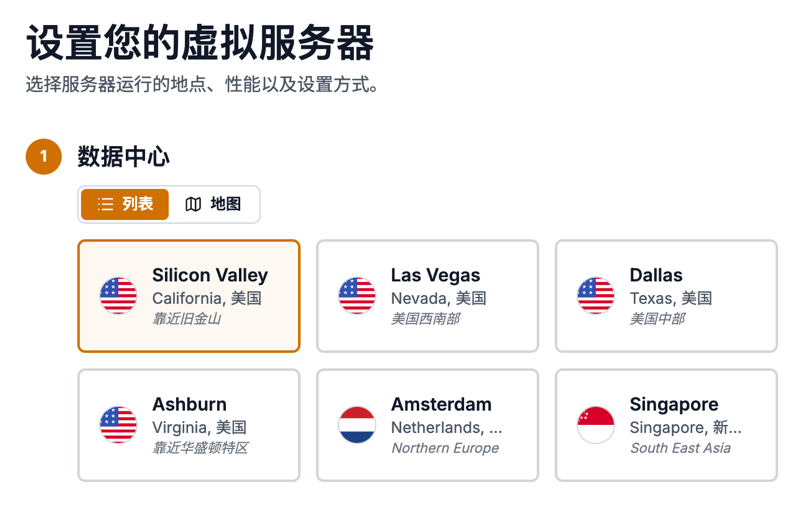
Three packages were offered. I selected LET-VAULT-M priced at $10/month. Payment for 2 or 3 years is even cheaper.
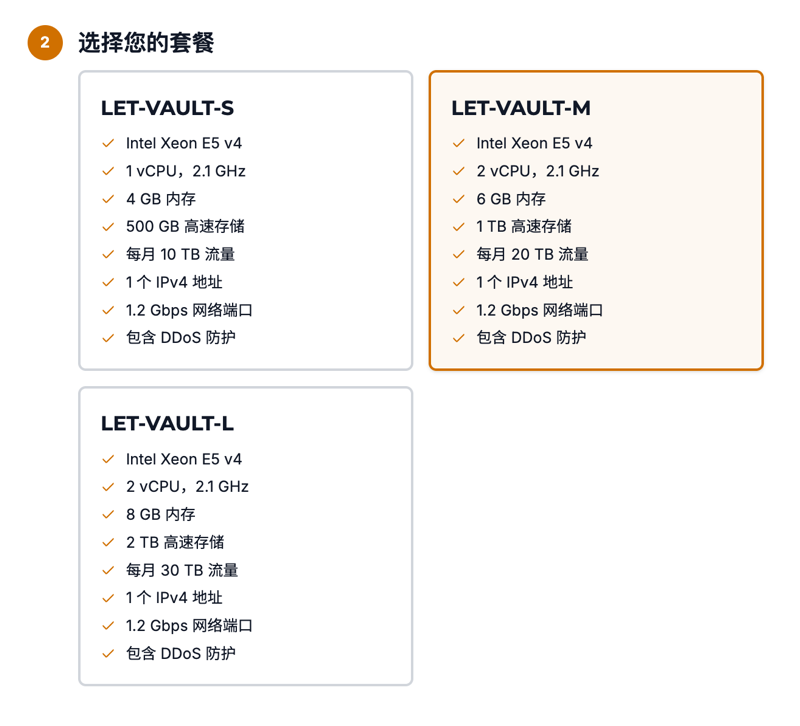
The configuration for LET-VAULT-M is:
- CPU: 2 Cores
- Memory: 6GB
- Disk: 1TB
- Traffic: 20TB per month. After leaving a message on LowEndTalk, traffic doubles to 40TB/month.
- Bandwidth: 1.2Gbps
Honestly, the cost-performance ratio is quite high. Payment methods include PayPal, VISA/MasterCard debit cards, Alipay, etc.
Data Center Selection
For access from China, considering three-network bandwidth, I recommend choosing the Silicon Valley or Las Vegas West Coast US data centers for lower latency and direct connections (non-optimized lines). Latency and packet loss rates vary by region and broadband type. Before purchasing, it is recommended to test using the official lookingglass address: https://scl-test-download.serverpoint.com/lookingglass/.
Note: I chose the Silicon Valley data center.
Simple Tests
I/O speed test results using bench.sh:
----------------------------------------------------------------------
 I/O Speed(1st run) : 364 MB/s
 I/O Speed(2nd run) : 375 MB/s
 I/O Speed(3rd run) : 420 MB/s
 I/O Speed(average) : 386.3 MB/s
----------------------------------------------------------------------
Bandwidth test using bench.sh: Upload can reach full 1.2Gbps, and some nodes exceed this bandwidth. Download speeds are even more impressive.
 Node Name        Upload Speed      Download Speed      Latency
 Speedtest.net    1177.68 Mbps      3254.85 Mbps        35.62 ms
 Los Angeles, US  8948.94 Mbps      6181.37 Mbps        10.65 ms
 Dallas, US       4924.65 Mbps      5350.66 Mbps        42.84 ms
 Montreal, CA     1864.47 Mbps      2515.58 Mbps        58.63 ms
 Paris, FR        3537.40 Mbps      2901.65 Mbps        134.97 ms
 Amsterdam, NL    631.35 Mbps       4419.65 Mbps        136.94 ms
Super Ping test from China shows an average latency of around 186ms.
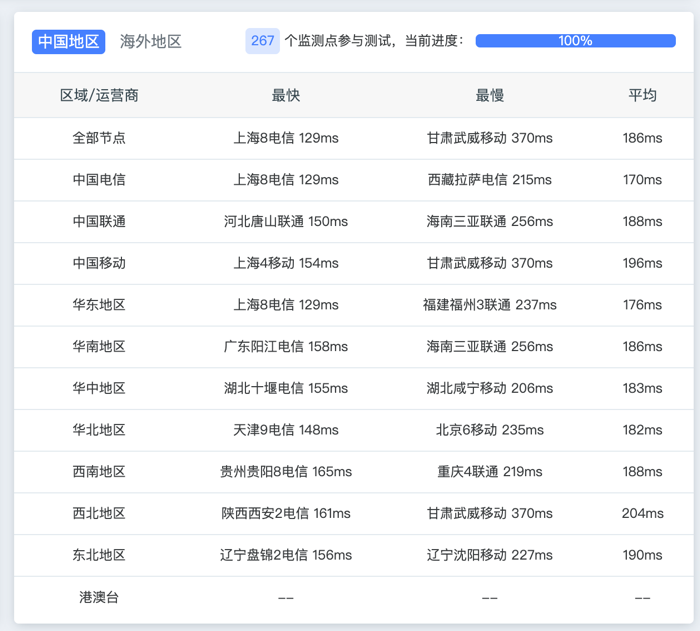
ServerPoint provides IPv6 addresses. The average latency for IPv6 testing from China is around 190ms, which is basically the same as IPv4.
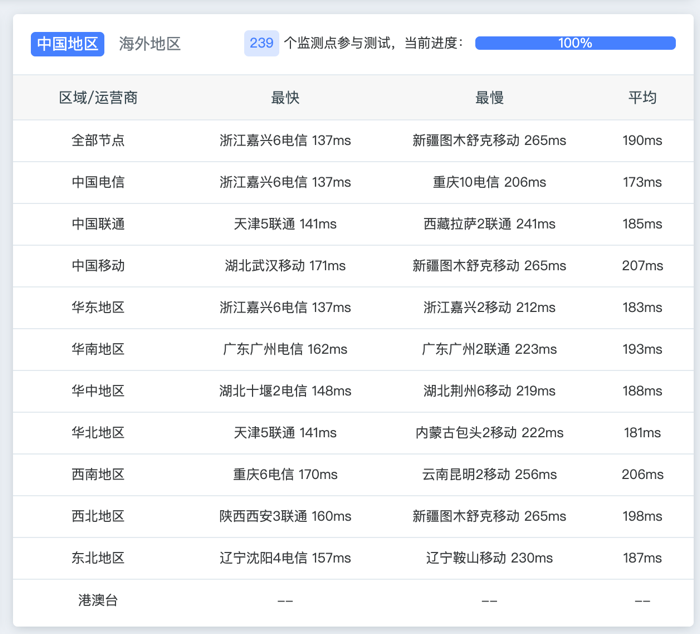
China Telecom in Sichuan has very low packet loss during the day, mostly within 5%, but during peak evening hours, packet loss may rise to around 20%.
Conclusion
This ServerPoint event machine offers high cost-performance, with ample bandwidth and traffic, and direct three-network connections in the Silicon Valley data center. However, regarding specific stability and potential issues, I will add more updates after using it for a while.
Note: This article contains no AFF promotions; feel free to read.