ZNote: A Lightweight, Private Markdown Note App with Docker Support
xiaoz has tried many note-taking software on the market, including Evernote, Youdao Note, WizNote, Obsidian, Joplin, Notion, Siyuan Note, UpNote, TriliumNext, and more. Some were ugly, some too bloated, some had sync issues, and others were overly complex. Ultimately, no single app felt perfect, leading to the idea of developing a custom note-taking tool. This idea existed for years but remained unexecuted until now.
With the help of AI, the vision has finally come to life, resulting in ZNote. Whether it's good or not, the goal is achieved. If you find it useful, feel free to deploy and try it.

ZNote Open Source: https://github.com/helloxz/znote
About ZNote
ZNote is a small yet beautiful pure note-taking application with native Markdown WYSIWYG support. Deploy once, use anywhere. Built with Bun + Hono.js + libSQL + Vue3.
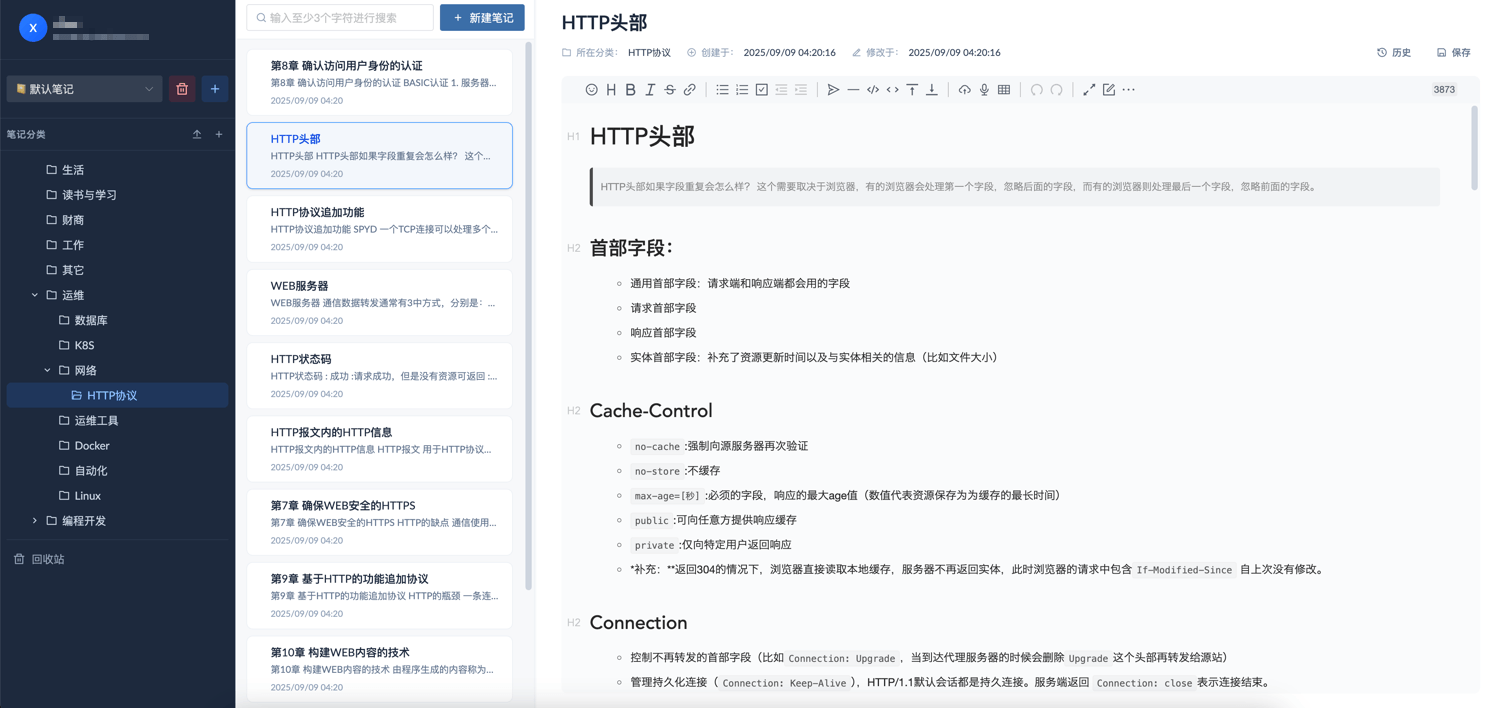
ZNote Official Website: https://znote.xphub.dev/
Demo Information
- Demo Address: https://znote.xphub.dev/
- Account:
demo - Password:
blog.xiaoz.org
ZNote Features
- Pure Note App: No mind maps, no checklists, no extra features—just focused on note-taking.
- Native Markdown: WYSIWYG editing for distraction-free content creation.
- No Sync Hassles: Centralized server storage eliminates the need for complex sync setups.
- Private Deployment: Docker-based private deployment ensures full data control and privacy.
- Web Access: Browser-based access without installing any client, supporting cross-platform usage.
- Drag-and-Drop Sorting: Supports drag-and-drop sorting for both note categories and content.
- Data Import: Import local
.mdfiles by packaging them into a ZIP and importing in one click. - Version History: Automatically records the last 50 versions for easy rollback.
- Multi-User Support: Supports up to 5 user accounts, ideal for individuals or families.
- Lightweight: Built with Bun + Hono.js + libSQL for fast startup and low resource usage.
- Global Search: Full-text search across categories with instant results.
- API Support: RESTful API for third-party integrations and automation.
How ZNote Solves My Pain Points
Why Not Pure Client-Side Note Apps?
Many client-side note apps are excellent but have drawbacks:
- Sync Difficulties: Require manual setup via WebDAV/S3/Git.
- Access Limitations: No web access support.
- Sorting Issues: Most lack flexible category and content sorting.
- Weak Version History: Some don't support version history or rely on sync services.
- No Multi-User Support: Sharing requires each user to install the client and configure sync.
ZNote prioritizes web access, making it universally usable. Future plans include PC clients and mobile apps.
Bloatware Problem
Some note apps are feature-rich but overly complex, including mind maps, checklists, and backlinks. ZNote focuses solely on note-taking without these extras.
Privacy Risks
Cloud-based note apps offer convenience but risk data leakage. ZNote ensures privacy through private deployment.
Multi-User Needs
Some private deployment solutions are complex, resource-heavy, or lack multi-user support. ZNote balances lightweight design with multi-user functionality (up to 5 users).
Note: These points reflect xiaoz's personal experience and may not represent all users. ZNote was developed based on specific pain points and may not meet everyone's needs.
Deploying ZNote
ZNote currently supports Docker installation. It is recommended to use Docker Compose. Create a compose.yaml file with the following content:
services:
  znote:
    container_name: znote
    image: helloz/znote:latest
    ports:
      - "3888:3888"
    volumes:
      - "./data:/app/data"
    restart: always
    environment:
      TZ: Asia/Shanghai
Run docker compose up -d to start. Access http://ip:3888 to begin. The first-time setup will guide you to create an admin account.
Additional Notes
ZNote is currently in the Beta phase and may have bugs or limitations. Future updates will include:
- Note sharing
- AI features
- Multi-language support
- Export all notes
- Document functionality
- Browser extension
- Mobile app
- PC client
Conclusion
ZNote was born from xiaoz's frustration with existing note apps that weren't quite right. It may not be the most powerful, but it is focused—pure note-taking with full data control.
If you're looking for a lightweight, private, and ready-to-use note tool, try deploying ZNote with Docker. Whether it works for you or not, it marks the end of a long-held wish.
Project Address: https://github.com/helloxz/znote