Zocr: A Lightweight, Ready-to-Use OCR API with One-Click Docker Deployment
Recently, the Baidu PaddlePaddle platform released the new PP-OCRv6 recognition model. While maintaining extreme lightness, it achieved a leap in both accuracy and speed. After personally deploying it, I found the recognition effect to be excellent, so I encapsulated it into an online HTTP API calling solution and am now officially open-sourcing it for everyone.
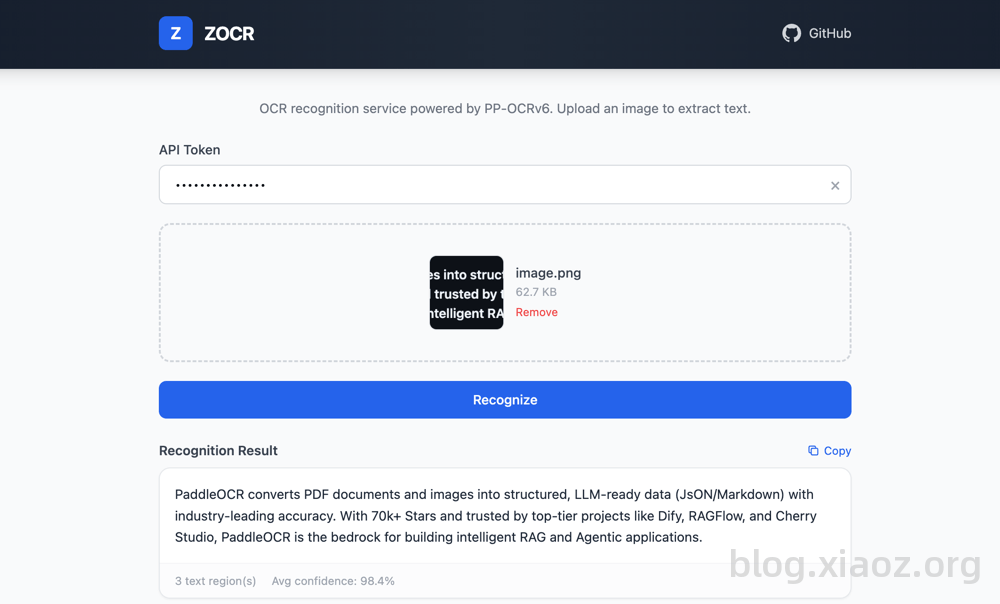
Zocr Open Source Address: https://github.com/helloxz/zocr
Zocr Features
I named this integrated solution Zocr, which has the following features:
- Based on the Baidu PaddlePaddle PP-OCRv6 recognition model, offering two selectable tiers: tiny / small
- Supports Bearer Token authentication
- Supports Docker containerized deployment
- Pure CPU inference, no GPU dependency
- Supports common image formats: jpg/jpeg/png/bmp/webp
- Supports HTTP calls
- Lightweight resource usage
Docker Compose Deployment
Create a compose.yaml file:
services:
  zocr:
    image: helloz/zocr
    container_name: zocr
    ports:
      - "5080:5080"
    environment:
      - ZOCR_TOKEN=your_token_here
    restart: always
Note: Please set
your_token_hereto your own key, supporting letters or numbers.
Optional environment variables:
ZOCR_WORKERS: Number of uvicorn worker processes, default is 1ZOCR_MODEL_VERSION: OCR model version (tiny/small), default is smallZOCR_MAX_FILE_SIZE: Maximum file size (bytes), default is 10485760
Start the service:
# Start the service
docker compose up -d
Usage
Testing
After deployment, visit http://IP:5080 to open the WEBUI, enter the ZOCR_TOKEN you just set, and upload an image to automatically recognize and extract text information.
HTTP API Call
The HTTP API supports two types of interfaces: one for uploading files for recognition, and another for recognition by passing an image URL. The calling methods are as follows:
# Call using curl (upload file)
curl -X POST http://localhost:5080/api/ocr/upload \
  -H "Authorization: Bearer your_token" \
  -F "file=@test.jpg"

# Call using curl (via URL)
curl "http://localhost:5080/api/ocr/fetch?url=https://example.com/image.jpg" \
  -H "Authorization: Bearer your_token"
The interface response format is:
{
    "code": 200,
    "msg": "success",
    "data": {
        "texts": ["Recognized Text 1", "Recognized Text 2"],
        "scores": [0.99, 0.95],
        "boxes": [[[0,0], [100,0], [100,30], [0,30]], ...],
        "full_text": "Recognized Text 1\nRecognized Text 2"
    }
}
Conclusion
Zocr is a lightweight OCR API encapsulated by xiaoz based on PP-OCRv6, supporting one-click Docker deployment and efficient operation on CPU alone. It is now open source; feel free to experience it, submit issues, or contribute code. If you find it helpful, please consider giving it a Star!