How to Uninstall Android Pre-installed Software Using Universal Debloater Alliance
Chinese Android phone systems often come pre-installed with a large number of software, including system software and third-party software that cannot be directly uninstalled, yet most of these pre-installed apps are likely unused. Although most third-party software can be uninstalled, some built-in software does not provide an uninstall function by the system.
This article will explain how to uninstall pre-installed software built into the HyperOS system, such as Sogou Input Method, Yellow Pages, and Fast Apps, using xiaoz's Xiaomi phone and Windows 11 operating system. The method is basically similar for other Android phones.
The following operations may carry risks. It is not recommended for beginners to operate. Do not uninstall software you are unclear about. Please backup before operating. This tutorial is not responsible for related risks!!!
Preparation
- Xiaomi Phone (HyperOS 1.x)
- Operating System: Windows 11
- Uninstall Tool: Universal Debloater Alliance (ADB)
Uninstall Android Software with Universal Debloater Alliance
Universal Debloater Alliance can be understood as a graphical ADB tool, relying on ADB at the underlying level.
Download Universal Debloater Alliance
Go to Github: https://github.com/Universal-Debloater-Alliance/universal-android-debloater-next-generation/releases to download the latest version of Universal Debloater Alliance.
Or directly visit: uad-ng-windows.exe (may require network tools).
Install ADB Tools
The principle of Universal Debloater Alliance is actually using ADB command tools to uninstall system built-in software. The reason for using Universal Debloater Alliance is to facilitate searching and finding software and graphical operations to improve operational efficiency. If you are an expert, you can also use ADB commands directly!
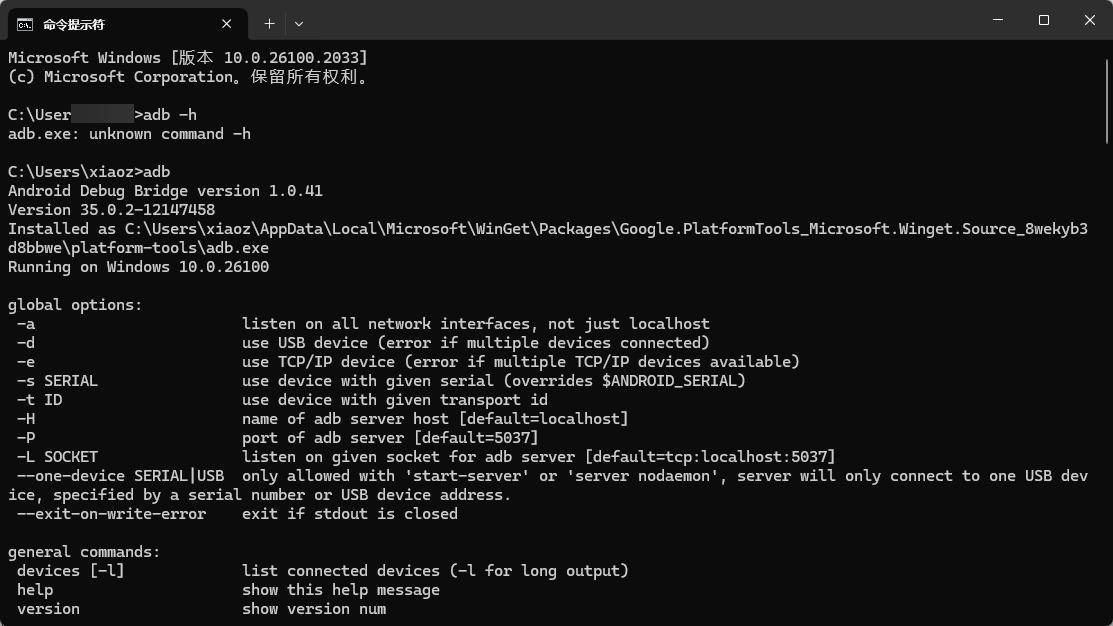
Windows 11 users can directly type winget install --id Google.PlatformTools in the cmd command line window to install. After successful installation, input adb to see the command prompt, as shown in the figure below.
Open Developer Mode
Communication between the ADB tool and the phone needs to be operated in developer mode, so you need to open [Settings - My Device - All Parameter Information - Click OS Version 7 times] to open Developer Options first.
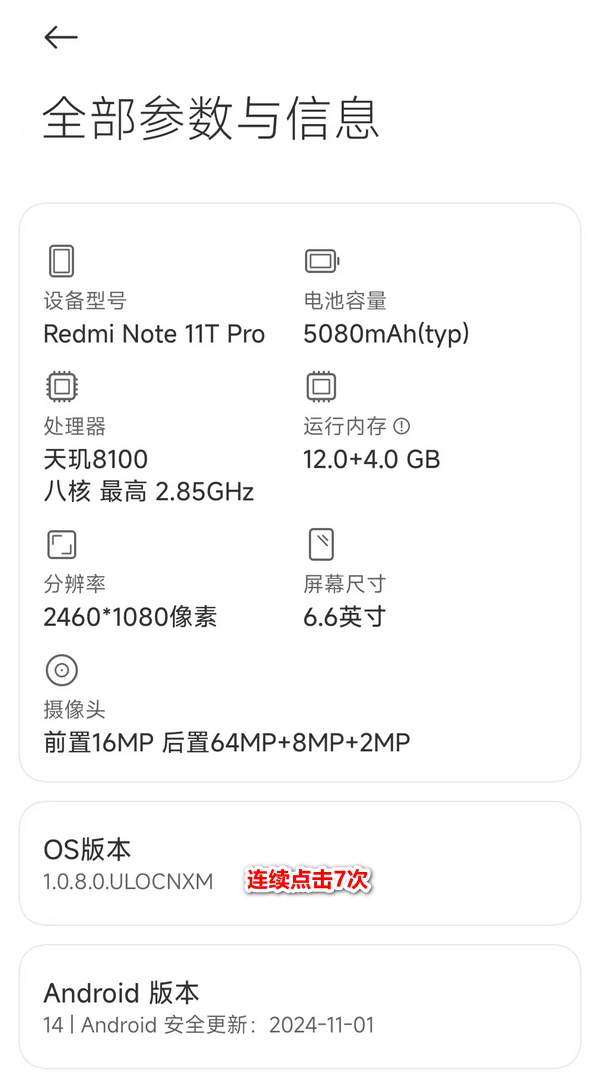
Other Android phone methods are basically similar, you can search online for specifics.
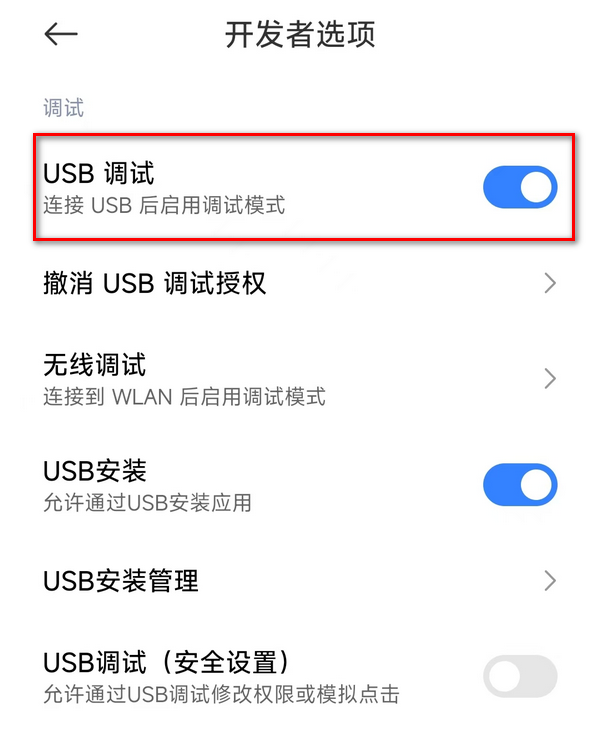
Additionally, you need to enable USB Debugging in [Developer Options], as shown in the figure below.
Install Drivers
Connect the Android phone to the computer, and change Charging to File Transfer in the notification bar.
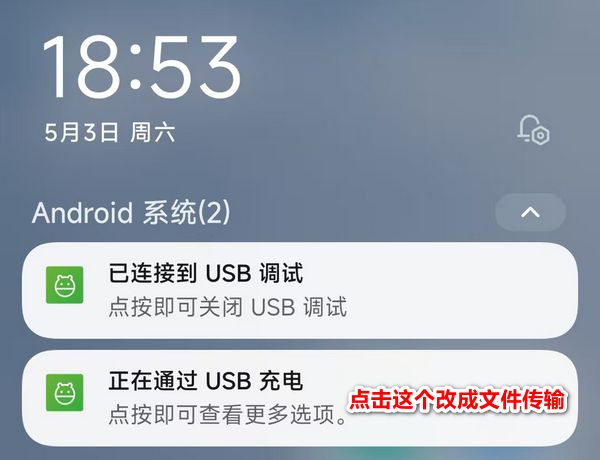
Then it will ask whether to allow USB debugging, click Allow.
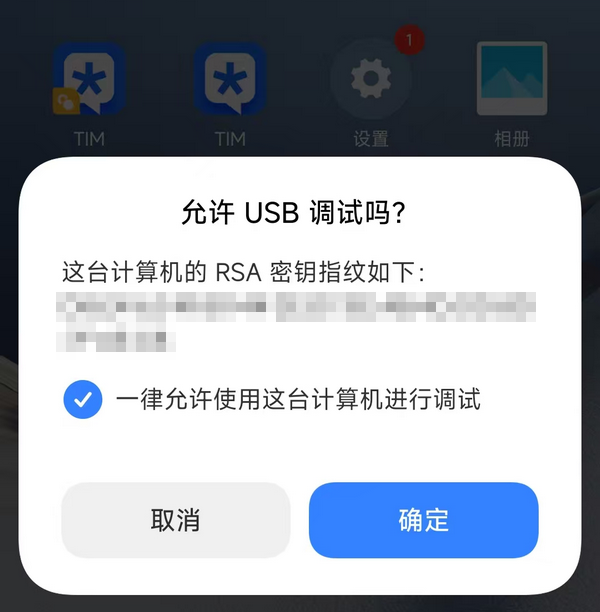
Normally, the phone driver will be automatically installed after the above steps.
Use Universal Debloater Alliance
Open uad-ng-windows.exe and you will see a large list of software, as shown in the figure below.
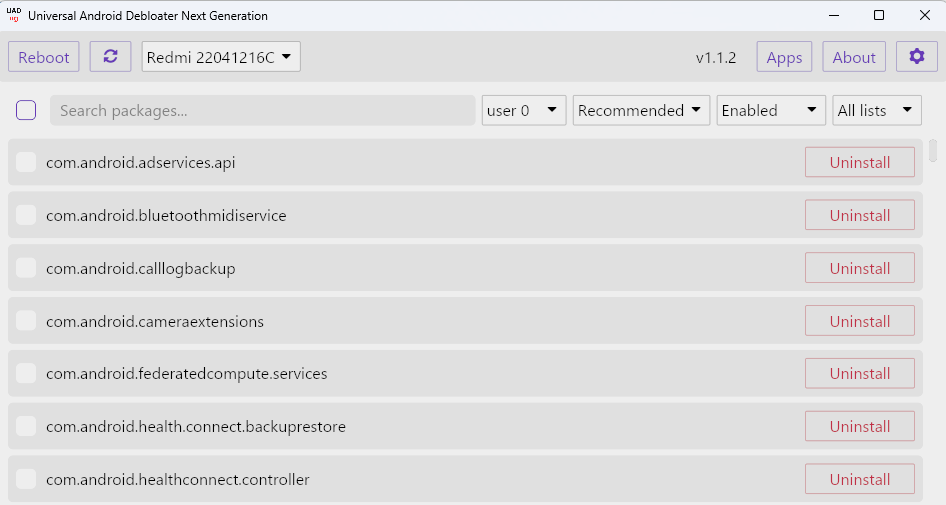
Do not uninstall software you are unclear about, as it may cause system abnormalities. xiaoz has organized a list of software that can be uninstalled on HyperOS. Everyone can choose to uninstall according to their needs.
| Software Package Name | Description |
|---|---|
| com.sohu.inputmethod.sogou.xiaomi | Xiaomi Customized Sogou Input Method |
| com.xiaomi.macro | Auto Combo |
| com.xiaomi.migameservice | Game High Energy Moment |
| com.miui.yellowpage | Life Yellow Pages |
| com.miui.bugreport | User Feedback |
| com.miui.miservice | Service and Feedback |
| com.miui.hybrid | Fast App Service Framework |
| com.miui.systemAdSolution | Xiaomi System Ad Solution |
| com.miui.analytics | Xiaomi Ad Analysis |
| com.xiaomi.gamecenter.sdk.service | Game Service |
Welcome to supplement other uninstallable software packages.
Conclusion
Through the above methods, we can effectively uninstall unnecessary pre-installed software in HyperOS, release storage space, and improve system fluency. However, note: please backup data before operation, carefully select uninstall items, and avoid deleting core components by mistake leading to system abnormalities. Different models have similar operation logic, it is recommended to refer to official documents or search online.