Under 30 Yuan: How to Make Your Phone Support eSIM Indirectly with eUICC Cards
eSIM has been widely adopted abroad for a long time, but most domestic phones still do not support eSIM. However, don't worry, we can now use eUICC cards to let phones that originally do not support eSIM indirectly support eSIM, and easily activate overseas eSIM cards. Xiaoz tested and confirmed it works.

What is an eUICC Card
A normal SIM card is an identity card fixed to one carrier, while an eUICC card is a blank card. You can write carrier identity information from other carriers into it as needed for use.
However, eUICC cards also have some limitations, such as:
- Does not support writing domestic carrier information
- Requires a physical eUICC card as a carrier
- Compatibility is not as good as phones that natively support eSIM
What is eSIM?
eSIM is a virtual SIM card inside the phone. You can understand it as a phone number identity written directly into the device. Its biggest benefit is that when you need to change plans or carriers in the future, you do not need to insert or remove physical cards; you can switch remotely and easily by scanning a QR code or using an App.
Implementation Principle
By using a physical blank eUICC card as a carrier, then using third-party apps to write eSIM card information from various overseas carriers into the eUICC card. Later, you can also manage adding, deleting, and switching operations through the app. One eUICC card can write multiple eSIM information, the specific number depends on the eUICC card capacity.
Buying an eUICC Card
Since we know the principle, next we just need to get an eUICC card + writing software, so that phones that originally do not support eSIM can indirectly support eSIM through the eUICC card.
Buy eUICC: To avoid advertising suspicions, the blogger does not recommend specific merchants. Everyone can search the keyword eUICC on Taobao or Pinduoduo to buy, generally under 30 Yuan.
Purchase Notes
eUICC cards have capacity limits. This capacity is used to save eSIM information, so the larger the capacity, the more eSIM cards can be written. Everyone can choose different specifications according to their usage.
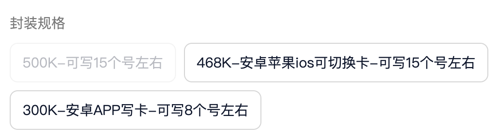
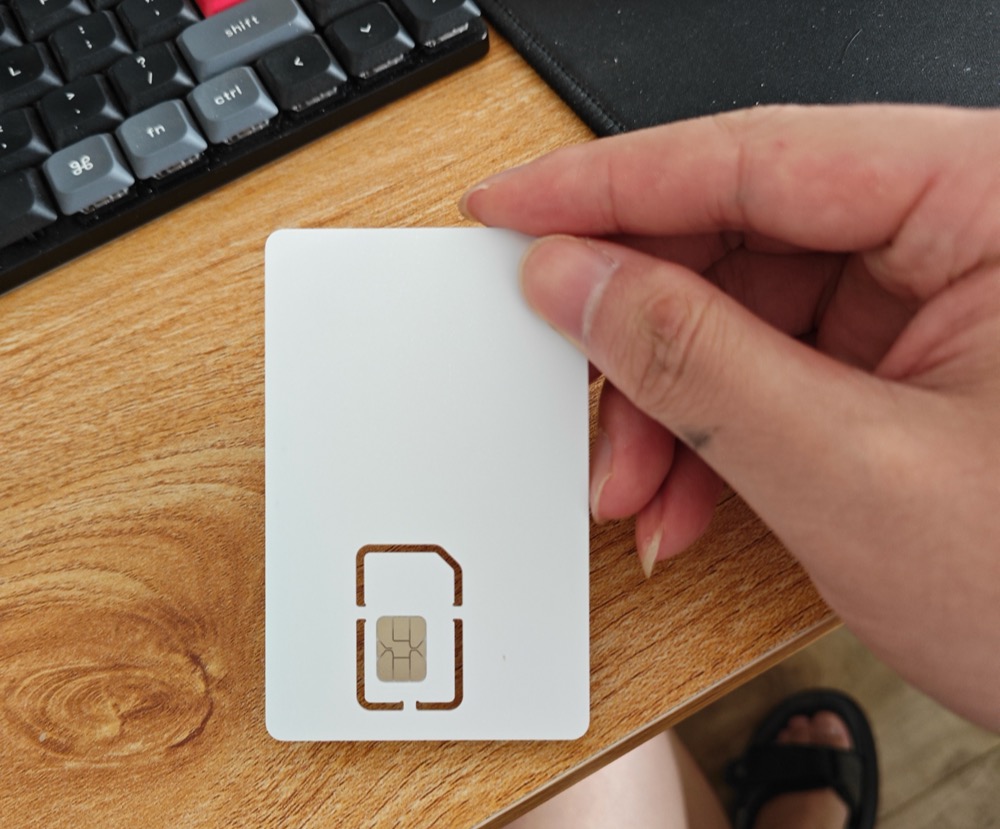
After receiving it, it is no different from a SIM card. It can be simply understood as a blank physical SIM card.
Using Software
Android
Android users are recommended to use EasyEUICC or NekokoLPA to manage eUICC eSIM cards. Corresponding download addresses are:
- EasyEUICC: https://gitea.angry.im/PeterCxy/OpenEUICC/releases/tag/unpriv-v1.4.0
- NekokoLPA: https://github.com/iebb/NekokoLPA/releases
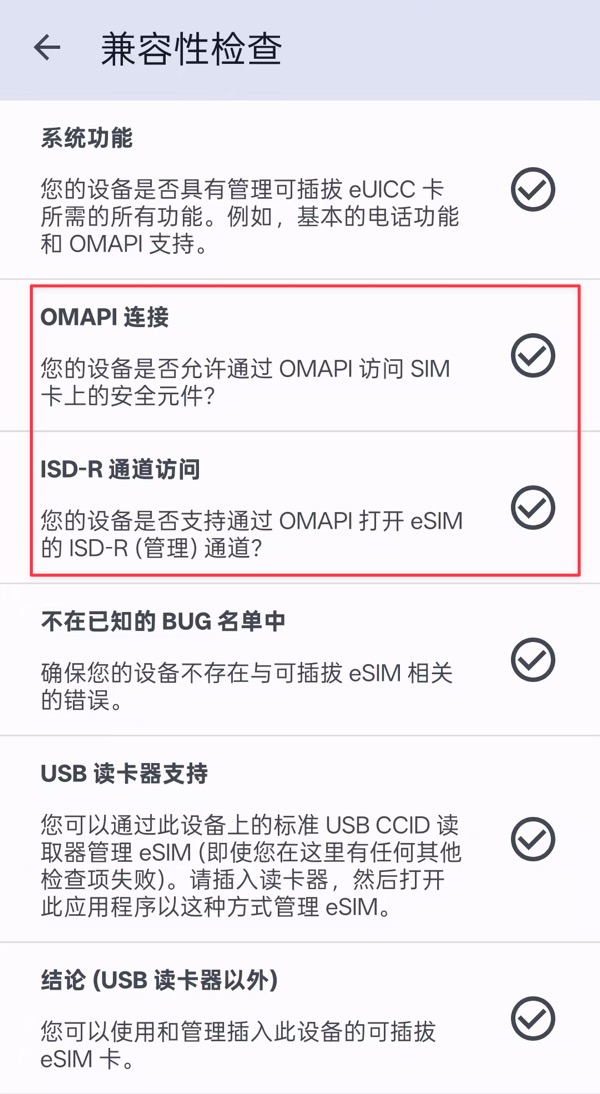
Before buying an eUICC card, you can first use the EasyEUICC software to test if the phone supports it. Mainly look at the OMAPI and ISD-R channels. If OMAPI is not supported, it cannot be used.
PC Software
If you need to write cards using a computer, you can use the following software:
- MiniLPA: https://github.com/EsimMoe/MiniLPA/releases
- EasyLPAC: https://github.com/creamlike1024/EasyLPAC/releases
Computer card writing needs to be used with a card reader, so you also need to get a card reader. However, the blogger directly used an Android phone to write cards, so no card reader was needed, and the blogger did not test using computer software + card reader. Those who need it can test it themselves.
Activating Overseas eSIM Cards
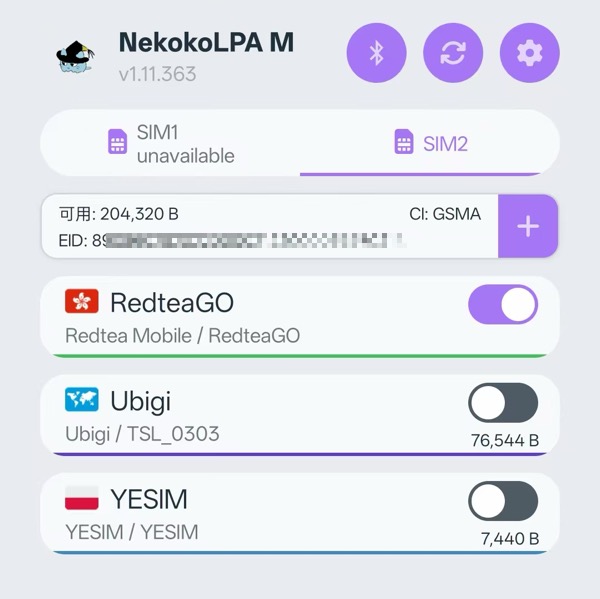
Since hardware and software are ready, and the phone now indirectly supports eSIM functions through eUICC, we still need to activate some actual overseas carriers to test if the eSIM function works normally. Here the blogger tested RedteaGO's overseas data card and it works: https://blog.xiaoz.org/archives/21854
How to Use on iPhone?
If you want to use it on iPhone, you can write cards on Android and then insert the eUICC card into the iPhone phone, or use a card reader + computer software to write cards, and then insert into iPhone for use.
Some Issues Encountered
Issue 1: Every time the blogger finishes writing cards and switches eSIM, opening the NekokoLPA APP again prompts that information cannot be read, but the eSIM can actually be used normally, just cannot be managed. Need to restart the phone once to recover. The seller said it is a phone compatibility issue. You can try if you have this problem.

Issue 2: After writing Ubigi eSIM card on Android, there is signal but cannot access the internet. After consulting friends, it was learned that it is caused by some actual frequency band issues on Android, while there is no such problem when using on iPhone!
Conclusion
eUICC cards allow traditional phones to enjoy the convenience of eSIM in a clever way. This small card costing less than 30 Yuan successfully bypasses phone hardware limitations, allowing you to freely add and manage multiple overseas eSIM carrier plans.
RedteaGO: Extremely cost-effective China mainland roaming internet eSIM data card: https://blog.xiaoz.org/archives/21854